
Snapshot Site is Now a Verified Node on n8n
TutoSartup excerpt from this article:
n8n-nodes-snapshot-site is now a verified community node on n8n… It’s installable directly — including on n8n Cloud — with no workaround needed for self-hosted-only community nodes… Install it In n8n, go to Settings → Community Nodes → Install, and enter: n8n-nodes-snapshot-siteAdd a S…
Snapshot Site is Now a Verified Node on n8n
n8n-nodes-snapshot-site is now a verified community node on n8n… It’s installable directly — including on n8n Cloud — with no workaround needed for self-hosted-only community nodes… Install it In n8n, go to Settings → Community Nodes → Install, and enter: n8n-nodes-snapshot-siteAdd a S…
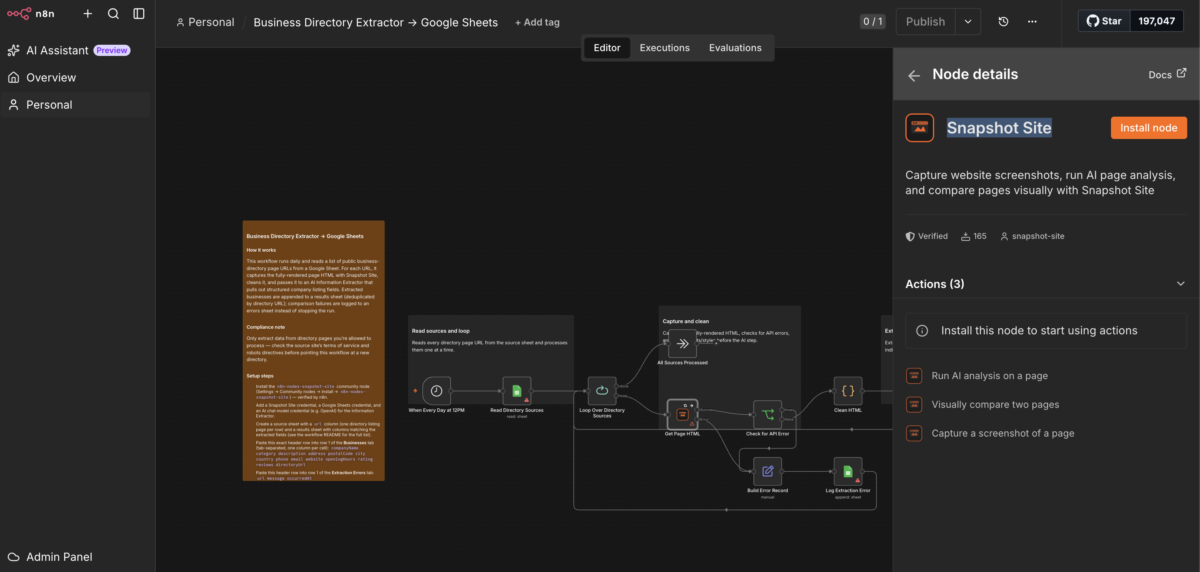
n8n-nodes-snapshot-site is now a verified community node on n8n. It’s installable directly — including on n8n Cloud — with no workaround needed for self-hosted-only community nodes.
Install it
In n8n, go to Settings → Community Nodes → Install, and enter:
n8n-nodes-snapshot-site
Add a Snapshot Site API credential (an API key from your Snapshot Site account), and the node is ready to use in any workflow.
What the operations do
| Operation | What it does |
|---|---|
Screenshot | Capture a page as PNG, JPEG, WebP, PDF, or full HTML, with viewport, full-page, cookie-hiding, and custom JS controls |
Analyze | Run AI summary, topic extraction, heading outline, and quality checks (blank page, CAPTCHA, readability) on a page |
Compare | Diff two page states — or a live page against a stored baseline image — and return a pixel mismatch score plus a diff image |
Compare is the one workflow authors keep coming back to: it turns “did this page change?” into a single node instead of a bespoke screenshot-diffing pipeline.
When this is useful
- Visual regression monitoring — catch a competitor’s pricing change, a defaced landing page, or an unintended deploy difference, and alert Slack or Discord automatically.
- Content operations — auto-summarize newly published pages into Notion, tagged with topics and a readability score.
- AI data extraction — capture a page’s fully-rendered HTML and hand it to an AI Information Extractor node to pull structured records (jobs, listings, products) into Google Sheets.
- QA and compliance — timestamped screenshots of legal pages, consent banners, or staging-vs-production checks.