

Automating identity lifecycle and security with AWS Directory Service APIs
AWS Directory Service for Managed Microsoft Active Directory, also known as AWS Managed Microsoft AD, has added new capabilities to manage users and groups… By using these APIs, collectively known as the Directory Service Data APIs, you can perform operations such as: Listing users and groups…
Managing identities and access across complex environments has become more critical than ever. AWS Directory Service for Managed Microsoft Active Directory, also known as AWS Managed Microsoft AD, has added new capabilities to manage users and groups. Now, you can perform create, read, update, and delete (CRUD) operations on users and groups directly through AWS Command Line Interface (AWS CLI), APIs, and the AWS Management Console. You can use this powerful capability to automate identity lifecycle management and enhance security in your AWS environment. By using these APIs, collectively known as the Directory Service Data APIs, you can perform operations such as:
- Listing users and groups
- Retrieving user and group details
- Disabling and enabling user accounts
- Resetting user passwords
- Managing group memberships
These APIs provide new possibilities for automating identity management tasks and integrating Active Directory management into your existing workflows and applications.
The introduction of these APIs brings several key benefits:
- Automation of the identity lifecycle: You can now programmatically manage user accounts throughout their lifecycle—from creation to deletion—enabling streamlined onboarding and offboarding processes.
- Enhanced security: By integrating these APIs with security services like Amazon GuardDuty, you can create automated responses to potential security threats, such as disabling accounts with inappropriate access.
- Improved compliance: You can use automated user management to help enforce consistent policies and help maintain compliance with various regulatory requirements.
- Operational efficiency: You can automate routine tasks such as user provisioning, deprovisioning, and group management, reducing manual effort and the potential for human error.
- Integration capabilities: By using these APIs, you can seamlessly integrate with existing identity management systems, custom applications, and third-party tools.
- Cost optimization: By automating processes and reducing manual intervention, you can potentially help your organization optimize operational costs associated with identity management.
In this post, we explore these new APIs and demonstrate how you can use them to create an automated solution for detecting and responding to unexpected behavior by Active Directory users. We walk through a practical example that combines GuardDuty, AWS Step Functions, Amazon EventBridge, and the new AWS Directory Service APIs to create a robust security automation workflow.
Solution overview
To demonstrate the power of these new APIs, let’s explore a practical solution that automates the detection and response to unexpected behavior by Active Directory users. This solution combines several AWS services to create a robust security automation workflow:
- GuardDuty continuously monitors for unexplained behavior of Active Directory users from AWS Managed Microsoft AD. For the example in this post, we’re using Backdoor:Runtime/C&CActivity.B!DNS
- An EventBridge rule detects GuardDuty findings related to these users and triggers a Step Functions workflow.
- The Step Functions workflow will:
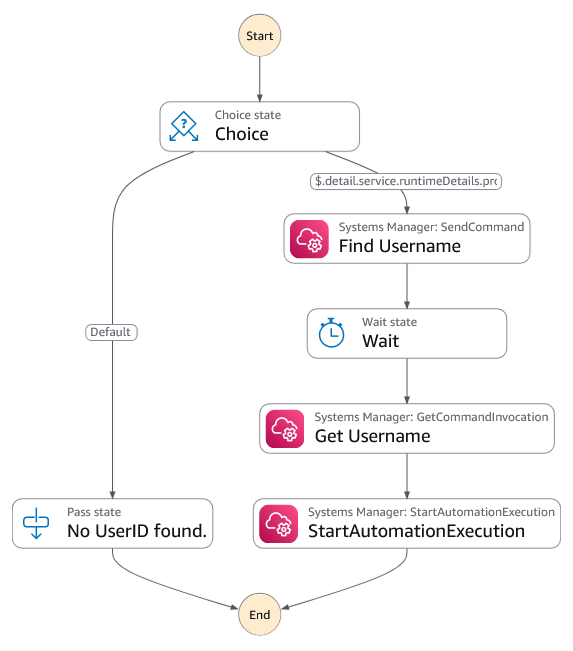
- Extract the Active Directory username from the instance using a run command.
- Start an automation that will disable the account using the
DisableUserAPI.
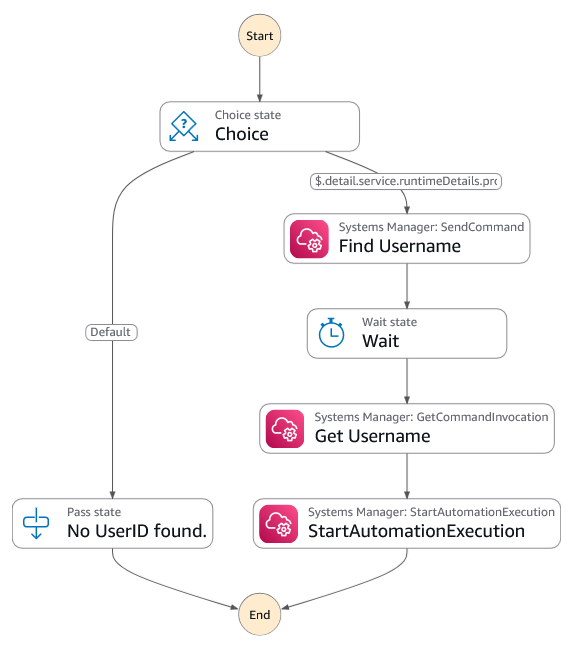
Figure 1: Diagram of the Step Functions workflow showing the process of Systems Manager finding the username and starting the automation to disable the account
- Finally, another EventBridge rule will monitor the
DisableUserAPI call. It will send an email to the user using Amazon Simple Notification Service (Amazon SNS) notifications.
This solution delivers automated, near real-time remediation of potential security threats — significantly reducing exposure windows and containing the impact of unauthorized account access.
The following figure shows a high-level architecture diagram of the solution.
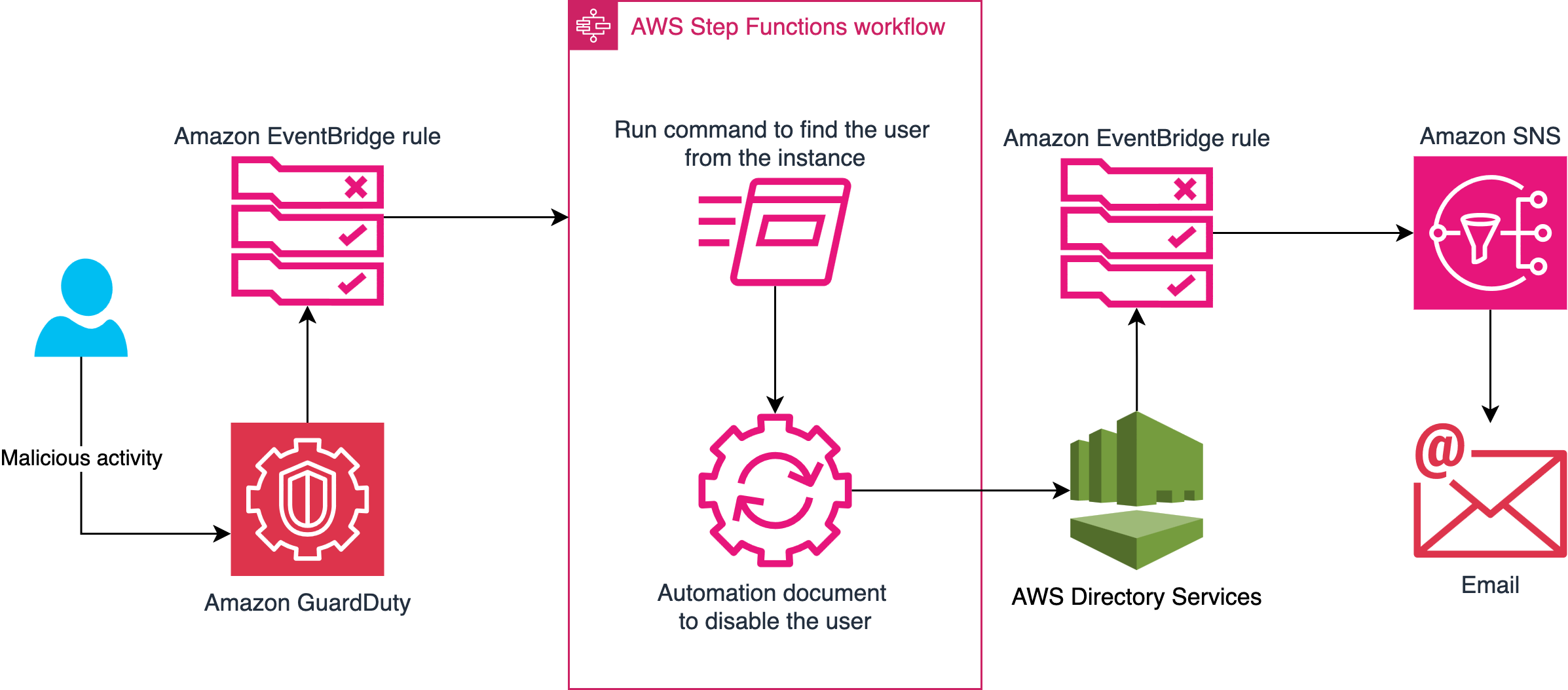
Figure 2: Diagram showing the workflow of what happens when potentially damaging activity is detected
Note: The solution must be deployed in the primary AWS Region of your directory.
Prerequisites
To complete the walkthrough in this post, you must have the following prerequisites in place.
GuardDuty
GuardDuty is an automated threat detection service that continuously monitors for unexpected activity and unauthorized behavior to protect your AWS accounts, workloads, and data stored in Amazon Simple Storage Service (Amazon S3).
To activate GuardDuty:
- Go to the GuardDuty console.
- If you’re activating GuardDuty for the first time, under Try threat detection with GuardDuty, select All Features and then choose Get Started.
- If you’ve used GuardDuty before, select Runtime Monitoring and then choose Enable under Runtime Monitoring.
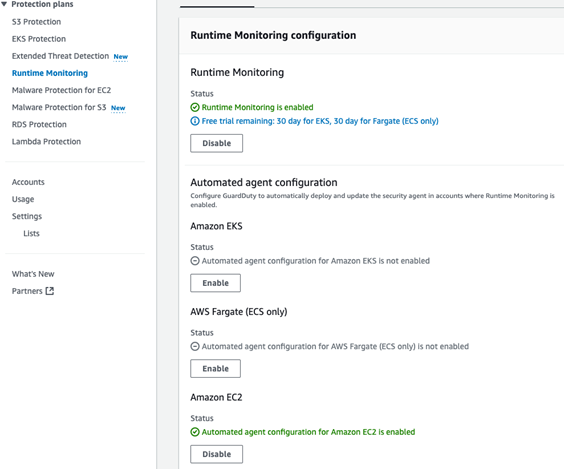
Figure 3: Runtime Monitoring enabled
AWS Managed Microsoft AD
AWS Managed Microsoft AD provides a fully managed service for Microsoft Active Directory (AD) in the AWS Cloud. When you create your directory, AWS deploys two domain controllers that are exclusively yours in separate Availability Zones for high availability. For use cases that require even higher resilience and performance in a specific AWS Region or during specific hours, you can scale AWS Managed Microsoft AD by deploying additional domain controllers to meet your needs. These domain controllers can help load balance, increase overall performance, or provide additional nodes to protect against temporary availability issues. Using AWS Managed Microsoft AD, you can define the correct number of domain controllers for your directory based on your use case.
To deploy a new AWS Managed Microsoft AD:
- Go to the Directory Service console.
- Choose Set up directory and select AWS Managed Microsoft AD.
- Select Standard Edition and enter a directory DNS name and password.
- Select a virtual private cloud (VPC). For this example, use the Default VPC.
- Choose Create directory.
Create a test Active Directory user
You will use this test user account to sign in to an EC2 instance and initiate a command that simulates unexplained activity that results in this account being disabled.
To create the test user, you can use AWS CloudShell or the AWS CLI from your local machine. Run the following commands, replacing the --directory-id value with your own:
Then
In this example, the password is set to YourSecurePassword123!. If you need to replace it with a password that meets your organization’s requirements, see Resetting and enabling an AWS Managed Microsoft AD user’s password. For more information on creating users, see Creating an AWS Managed Microsoft AD user in the AWS Directory Service documentation.
Test EC2 instance
To generate alerts on GuardDuty, you need a domain joined Linux EC2 instance. If you don’t have a domain joined EC2 Linux instance, follow these instructions for joining a Linux instance to an Active Directory domain. This instance will be used to simulate suspicious activity that triggers a GuardDuty finding and initiates the automated remediation workflow.
Implement the solution
Let’s walk through the steps to implement this solution in your AWS environment.
Deploy the solution
- Download the CloudFormation template
- Navigate to the CloudFormation console in the AWS account.
- For Create Stack, choose with new resources (standard).
- For Template source, choose Upload a template file. Choose Choose file and select the template you downloaded in step 1.
- Choose Next.
- For Stack name, enter a stack name (such as
CRUD-API-MAD). - In the Parameters area, do the following:
- For DirectoryID, enter the AWS Active Directory ID.
- For NotificationEmail, enter the email address to send the notification to.
- On the Configure stack options page, choose Next.
- Select I acknowledge that AWS CloudFormation might create IAM resources with custom names, then choose Submit.
After the page is refreshed, the status of your stack should be CREATE_IN_PROGRESS. When the status changes to CREATE_COMPLETE, proceed to the next section.
Test
To simulate a threat, use a GuardDuty test domain that GuardDuty will recognize as a command and control server.
- Go to the Amazon EC2 console.
- Choose Instances from the navigation pane.
- Select the test EC2 instance that you created earlier.
- Choose Connect, select the Session Manager tab, and choose Connect.
- Authenticate with your test user by entering
sufollowed by the test user with the domain name that you created earlier. For examplesu TestUser@example.com, then enter the password. - Enter the command
curl guarddutyc2activityb.com.
You will receive an error because the page won’t resolve, but GuardDuty will have detected concerning events. - Go to the GuardDuty console and select Findings from the navigation pane.
- Within 3–5 minutes, you should see a high severity finding for Backdoor:Runtime/C&CActivity.B!DNS.
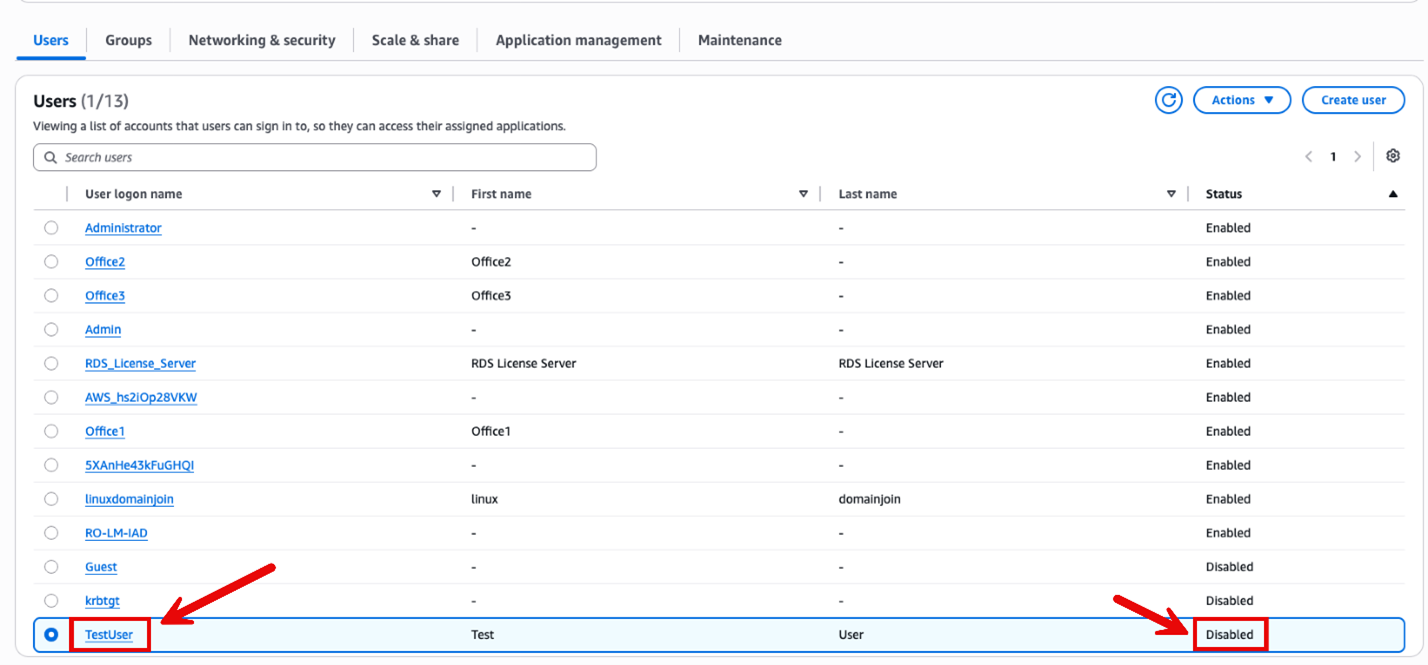
- This will then trigger the automation to disable the account.

Figure 4: Account successfully disabled
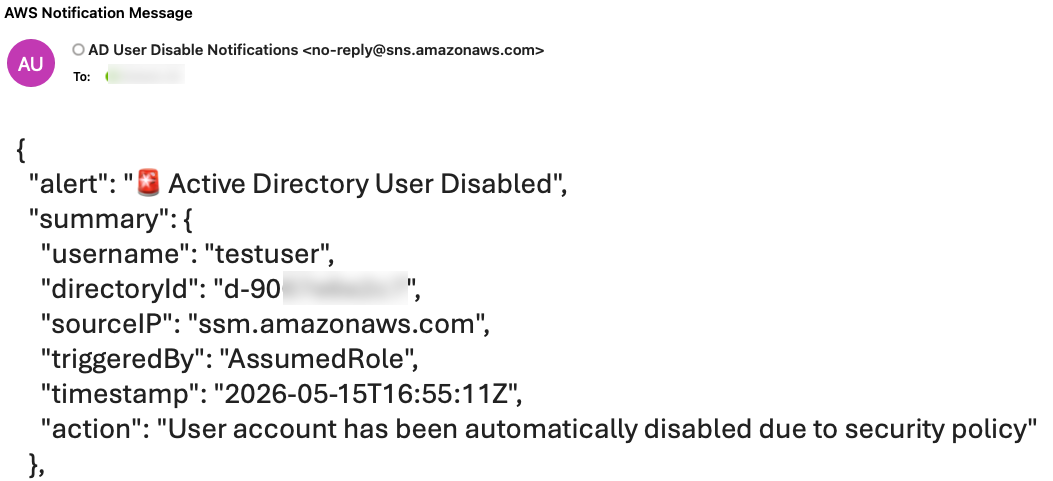
- After the account is disabled, an email notification will be sent notifying an administrator that the account was disabled (it might take up to 5 minutes to receive the notification).

Figure 5: AWS notification message showing the username has been disabled
Note: You must archive the GuardDuty finding before running this test again, because the EventBridge rule only runs once against a GuardDuty finding with the same details. To archive the finding, select the check box next to the Backdoor:Runtime/C&CActivity.B!DNS finding, choose Actions (top right), and select Archive.
Conclusion
The new AWS Directory Service APIs for AWS Managed Microsoft AD provide powerful capabilities for programmatically managing Active Directory users and groups. By using these APIs in conjunction with services such as Amazon GuardDuty and AWS Step Functions, you can create sophisticated automation workflows that enhance your security posture and streamline identity management processes.
The solution we’ve explored in this post demonstrates just one of many possible use cases for these new APIs. As you integrate these capabilities into your own environments, you will probably discover numerous opportunities to improve efficiency, security, and compliance in your identity management practices.
For a solution that uses PowerShell Active Directory cmdlets with AWS Systems Manager Run Command to disable users, see How to automatically disable users in AWS Managed Microsoft AD based on GuardDuty findings.
For more information about AWS Directory Service and its APIs, visit the AWS Directory Service documentation.
We’re excited to see how you’ll use these new APIs to innovate and improve your identity management workflows. If you have any questions or want to share your own use cases, leave a comment below or reach out to AWS Support.
Remember, the cloud journey is all about continuous improvement and innovation. Keep exploring, keep learning, and keep pushing the boundaries of what’s possible with AWS.
Author: Ali Alzand