

Best practices to run inference on Amazon SageMaker HyperPod
This post explores how Amazon SageMaker HyperPod addresses these challenges by providing a comprehensive solution for inference workloads… By the end of this post, you’ll understand how to use the HyperPod automated infrastructure, cost optimization features, and performance enhancements to re…
Deploying and scaling foundation models for generative AI inference presents challenges for organizations. Teams often struggle with complex infrastructure setup, unpredictable traffic patterns that lead to over-provisioning or performance bottlenecks, and the operational overhead of managing GPU resources efficiently. These pain points result in delayed time-to-market, suboptimal model performance, and inflated costs that can make AI initiatives unsustainable at scale.
This post explores how Amazon SageMaker HyperPod addresses these challenges by providing a comprehensive solution for inference workloads. We walk you through the platform’s key capabilities for dynamic scaling, simplified deployment, and intelligent resource management. By the end of this post, you’ll understand how to use the HyperPod automated infrastructure, cost optimization features, and performance enhancements to reduce your total cost of ownership by up to 40% while accelerating your generative AI deployments from concept to production.
Cluster creation – one click deployment
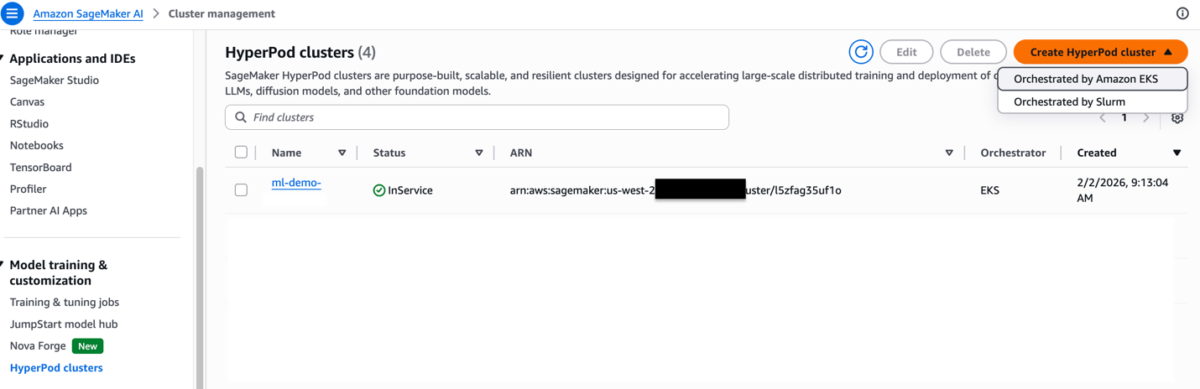
To create a HyperPod cluster with Amazon Elastic Kubernetes Service (Amazon EKS) orchestration, navigate to the SageMaker HyperPod Clusters page in the Amazon SageMaker AI console.
Step 1:
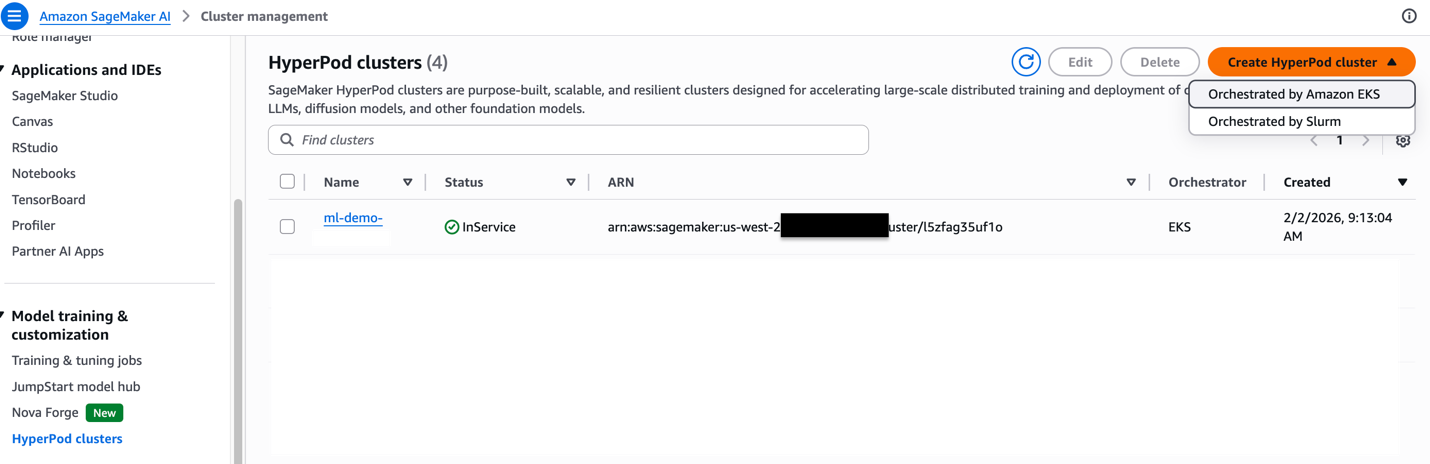
Choose Create HyperPod cluster. Then, choose the Orchestrated by Amazon EKS option.
Step 2
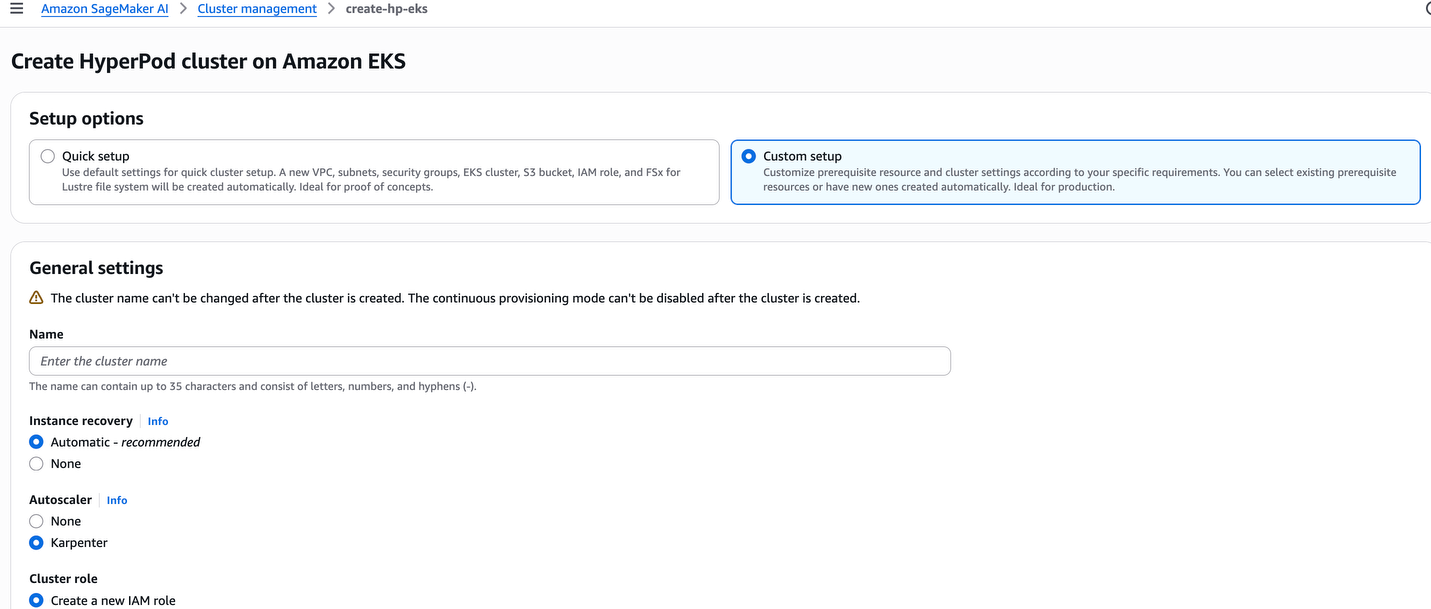
Choose either the quick setup or custom setup option. The quick setup option creates default resources, while the custom setup option allows you to integrate with existing resources or customize the configuration to meet your specific needs.
Step 3
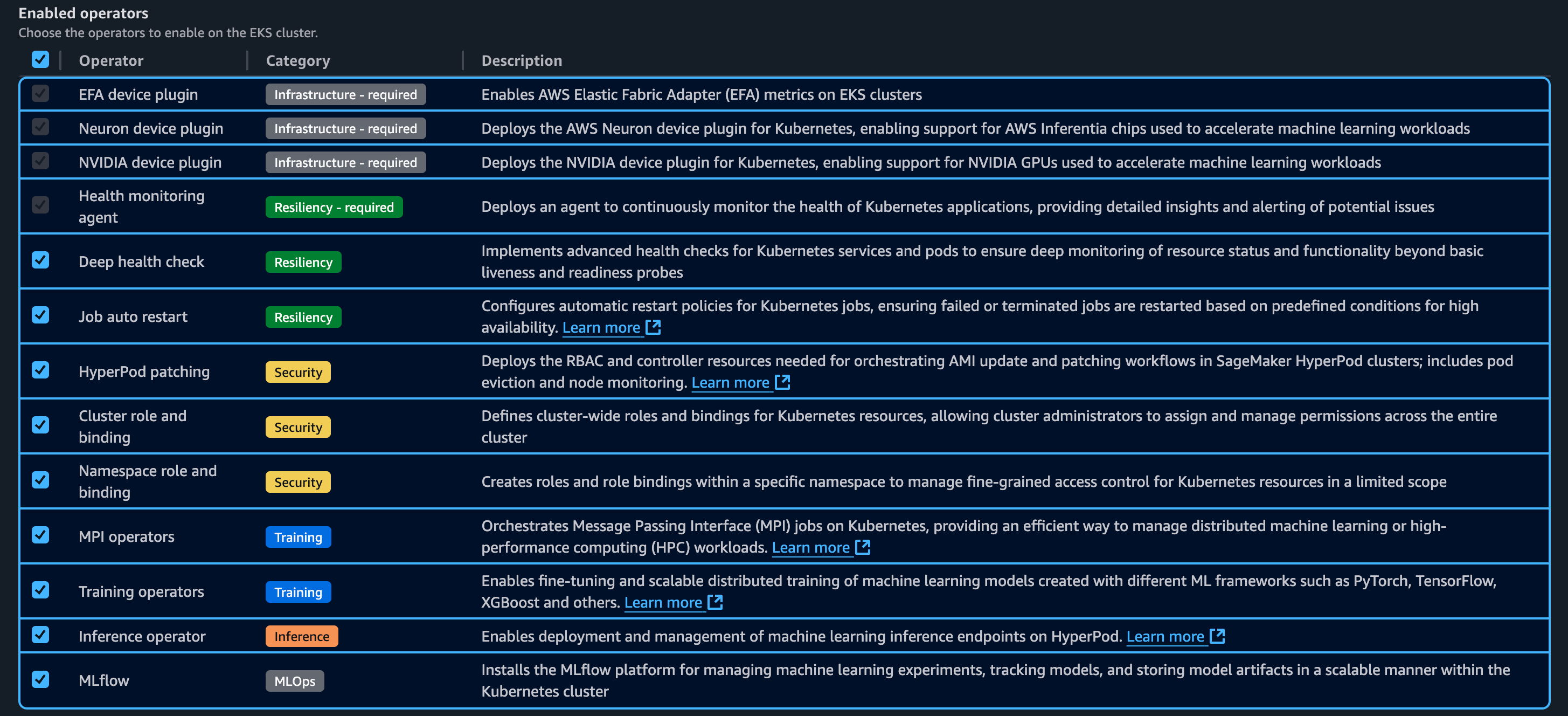
The following are Kubernetes controllers and add-ons. These controllers and add-ons can be enabled or disabled.
Step 4
The following diagram shows the high-level architecture of SageMaker HyperPod with the Amazon EKS orchestrator control plane.
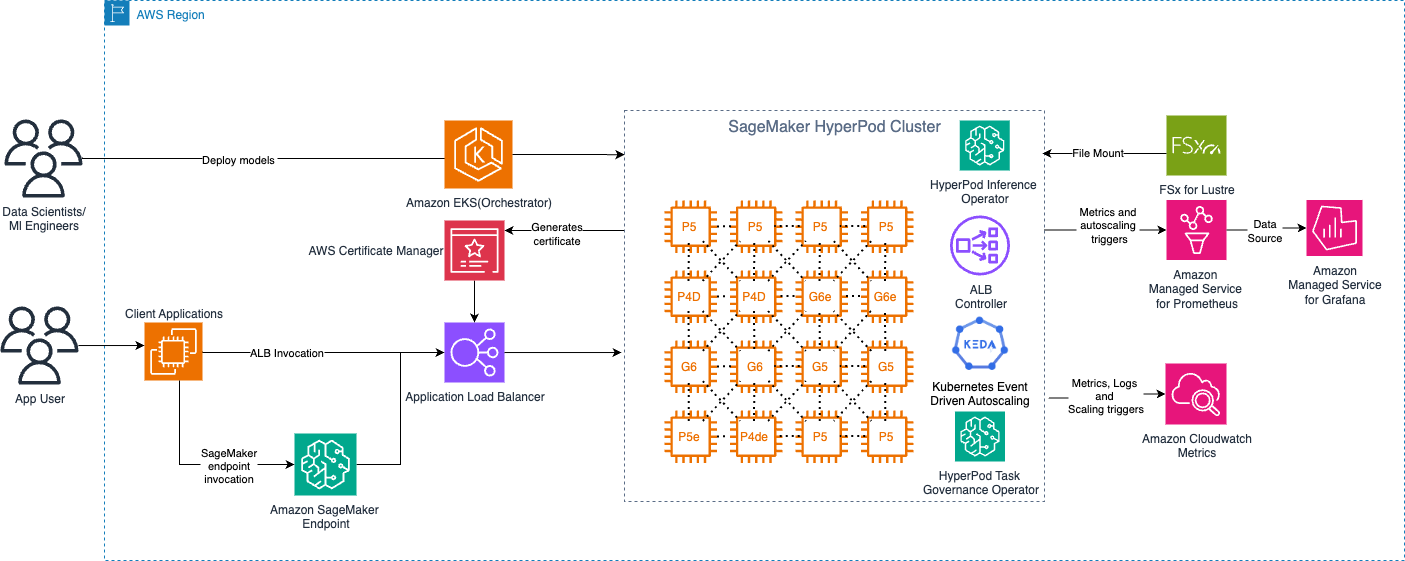
Deployment options
Amazon SageMaker HyperPod now offers a comprehensive inference platform, combining Kubernetes flexibility with AWS managed services. You can deploy, scale, and optimize machine learning models with production reliability throughout their lifecycle. The platform provides flexible deployment interfaces, advanced autoscaling, and comprehensive monitoring features. With the Inference deployment operator, you can deploy models from S3 buckets, FSx for Lustre, and JumpStart without writing code.
- Deploy from SageMaker JumpStart (Code Sample Notebook)
- Deploying
InferenceEndpointConfigmodels- Deploying custom or fine-tuned models from S3 (Code Sample Notebook)
- Deploying custom or fine-tuned models from FSX Lustre (Code Sample Notebook)
Auto Scaling with Karpenter
Amazon SageMaker HyperPod provides an Auto Scaling architecture that combines KEDA (Kubernetes Event-Driven Autoscaling) for pod-level scaling and Karpenter for node-level scaling. This dual-layer approach enables dynamic, cost-efficient infrastructure that scales from zero to production workloads based on real-time demand.
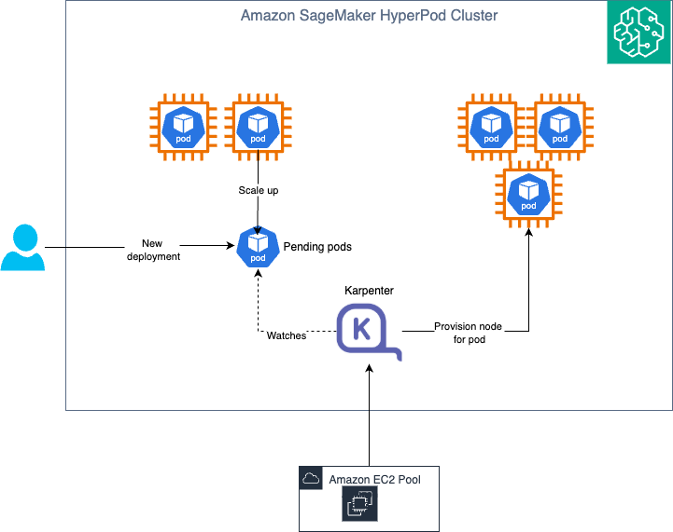
Elaborate Auto Scaling with KEDA and Karpenter
Understanding the Auto Scaling architecture
Pod Scaling (KEDA): KEDA (Kubernetes Event-Driven Autoscaling) is an open-source Cloud Native Computing Foundation (CNCF) project that extends Kubernetes with event-driven autoscaling capabilities. KEDA is automatically installed as part of the HyperPod Inference Operator, providing out-of-the-box pod autoscaling without requiring separate installation or configuration. KEDA scales the number of inference pods based on metrics like request queue length, Amazon CloudWatch metrics (such as SageMaker endpoint invocations), latency, or custom Prometheus metrics. It can scale deployments down to zero pods when there is no traffic, eliminating costs during idle periods.
Node Scaling (Karpenter): Karpenter is a Kubernetes cluster autoscaler that provisions or removes compute nodes based on pending pod requirements. Karpenter runs in the Amazon EKS control plane, which means there are no additional compute costs for running the autoscaler itself. This control plane deployment enables true scale-to-zero capabilities. When KEDA scales pods down to zero because of no traffic, Karpenter can remove all worker nodes, ensuring you incur no infrastructure costs during idle periods.
How KEDA and Karpenter work together
The integration between KEDA and Karpenter creates an efficient Auto Scaling experience. The ADOT (AWS Distro for OpenTelemetry) Collector scrapes metrics from inference pods and pushes them to Amazon Managed Service for Prometheus or CloudWatch, which the KEDA Operator (installed with the Inference Operator) periodically polls and evaluates against configured trigger thresholds defined in your JumpStartModel or InferenceEndpointConfig YAML. When metrics exceed thresholds, KEDA triggers the Horizontal Pod Autoscaler (HPA) to create new inference pods, and if these pods remain pending because of insufficient node capacity, Karpenter (running in the control plane) detects this and provisions new nodes with the appropriate instance types and GPU configurations. The Kubernetes scheduler then deploys pending pods to the newly provisioned nodes, distributing inference traffic across the scaled infrastructure. When demand decreases, KEDA scales down pods based on the same metrics. Karpenter consolidates workloads and removes underutilized nodes to reduce infrastructure costs. During periods of no traffic, KEDA can scale to zero pods, and Karpenter removes all worker nodes. This results in zero compute costs while maintaining the ability to rapidly scale back up when traffic resumes. This architecture ensures that you only pay for compute resources when they’re actively serving inference requests, with no additional costs for the autoscaling infrastructure itself since Karpenter runs in the managed control plane.
Verify that the cluster execution role has the following policies
"sagemaker:BatchAddClusterNodes", "sagemaker:BatchDeleteClusterNodes", "sagemaker:BatchPutMetrics" on the following resources "arn:aws:sagemaker:us-east-1:actxxxxxxxx:cluster/*", "arn:aws:sagemaker:us-east-1:actxxxxxxx:cluster/sagemaker-ml-cluster-e3cb1e31-eks"
To enable Karpenter – Run the following command
The following is the success output.
{
 "ClusterArn": "arn:aws:sagemaker:us-east-1:XXXXXXXXXXXX:cluster/4dehnrxxettz"
 }
After you run this command and update the cluster, you can verify that Karpenter has been enabled by running the DescribeCluster API.
KV caching and intelligent routing
Amazon SageMaker HyperPod now supports managed tiered KV cache and intelligent routing to optimize large language model (LLM) inference performance, particularly for long-context prompts and multi-turn conversations.
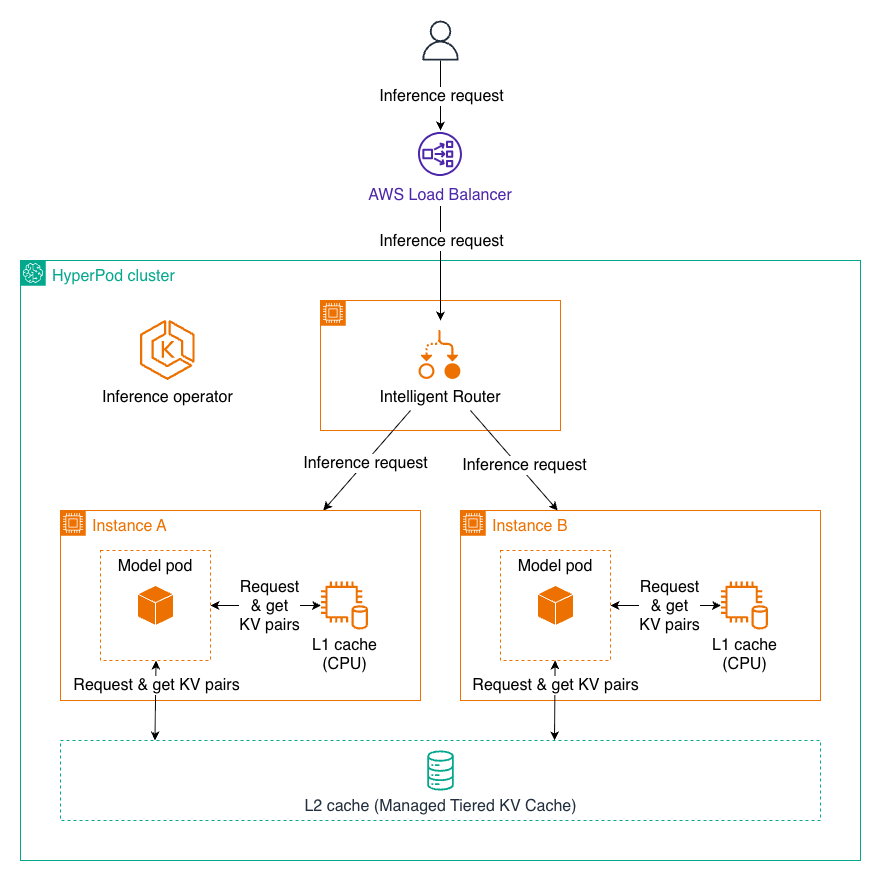
Inference request using L1 and L2 KV caching
Managed tiered KV cache
The managed tiered KV cache feature addresses memory constraints during inference by implementing a multi-tier caching strategy. Key-value (KV) caching is essential for LLM inference efficiency. It stores intermediate attention computations from previous tokens, avoiding redundant recalculations and significantly reducing latency.
By managing cache across multiple storage tiers, HyperPod enables:
- Reduced memory pressure on GPU resources
- Support for longer context windows without performance degradation
- Automatic cache management without manual intervention
Intelligent routing
Intelligent routing optimizes inference by directing requests with shared prompt prefixes to the same inference instance, maximizing KV cache reuse. This approach:
- Routes requests strategically to instances that have already processed similar prefixes
- Accelerates processing by reusing cached KV data
- Reduces latency for multi-turn conversations and batch requests with common contexts
Performance benefits
Together, these capabilities deliver substantial improvements:
- Up to 40% reduction in latency for inference requests
- 25% improvement in throughput for processing requests
- 25% cost savings compared to baseline configurations without these optimizations
These features are available through the HyperPod Inference Operator, providing out-of-the-box managed capabilities for production LLM deployments. For more details about this feature, see Managed Tiered KV Cache and Intelligent Routing for Amazon SageMaker HyperPod.
Multi-instance GPU support (MIG) profile
SageMaker HyperPod Inference now supports model deployments on accelerators that have been partitioned using NVIDIA MIG (Multi Instance GPU) technology. Deploying small models on large GPUs can waste GPU resources. To address this, SageMaker HyperPod allows you to use a fraction of GPUs that work in isolation with each other. If the GPU has already been partitioned, you can directly deploy the JumpStart Model or InferenceEndpointConfig using the SageMaker HyperPod Inference solution. For JumpStartModels, you can use spec.server.acceleratorPartitionType to set the MIG profile of your choice. The following example shows the configuration:
The JumpStartModel also conducts an internal validation before model deployment. You can switch that validation off using spec.server.validations.acceleratorPartitionValidation field in YAML and setting it to false. For InferenceEndpointConfig, you can deploy the model on the MIG profile of your choice using fields spec.worker.resources.requests and spec.worker.resources.limits to the MIG profile of your choice. The following example shows the configuration:
apiVersion: inference.sagemaker.aws.amazon.com/v1kind: InferenceEndpointConfig….spec: worker: resources: requests: cpu: 5600m memory: 10Gi nvidia.com/mig-4g.71gb: 1 limits: nvidia.com/mig-4g.71gb: 1
With these configurations, you can use other technologies supported by SageMaker HyperPod Inference along with MIG deployment of the model. For any additional information, see HyperPod now supports Multi-Instance GPU to maximize GPU utilization for generative AI tasks.
Observability
You can monitor HyperPod Inference metrics through SageMaker HyperPod observability features.
To enable SageMaker HyperPod observability features, follow the instructions in Accelerate foundation model development with one-click observability in Amazon SageMaker HyperPod.
HyperPod observability provides built-in dashboards in Grafana. For example, the Inference dashboard provides visibility into inference-related metrics like Incoming Requests, Latency, and Time to First Byte (TTFB).
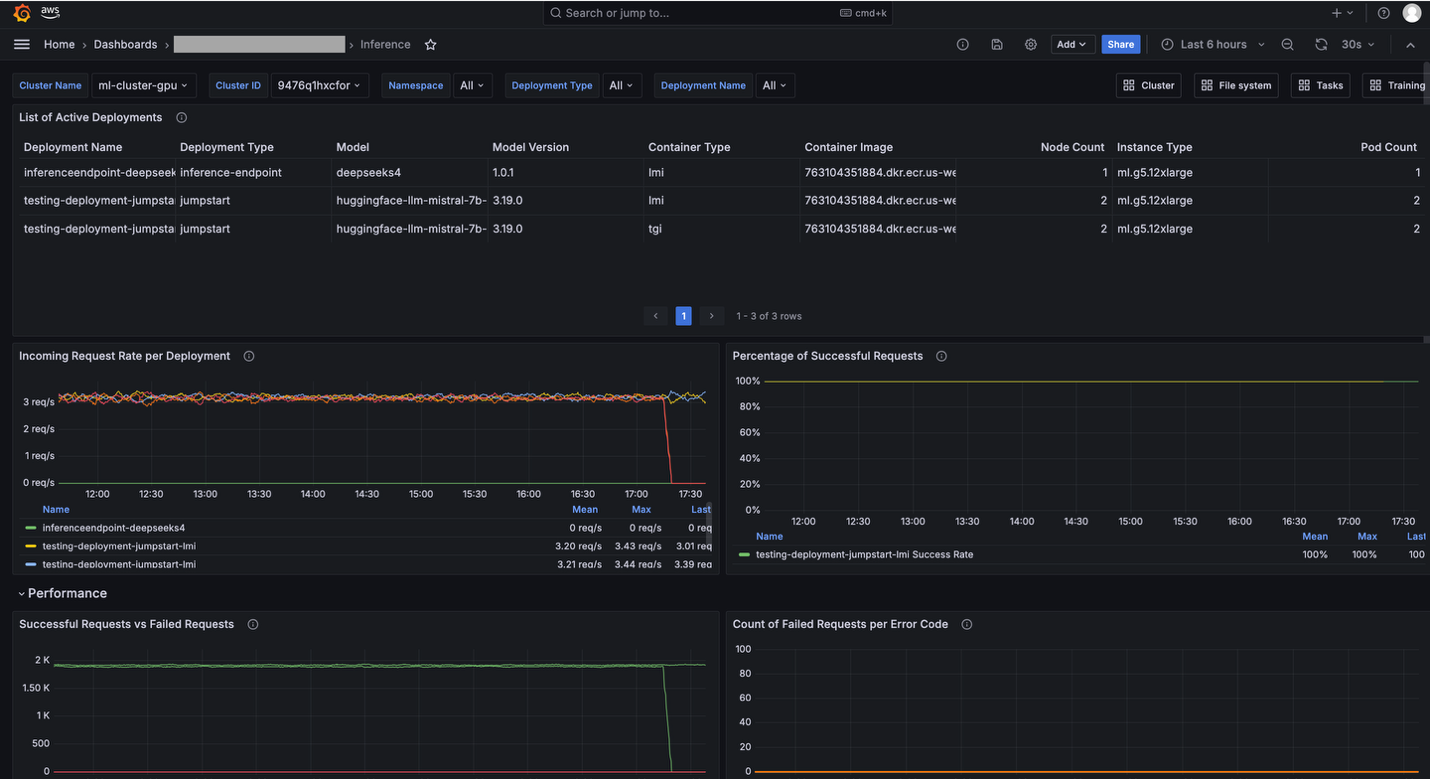
Grafana dashboard
Running notebook
HyperPod clusters with Amazon EKS orchestration now support creating and managing interactive development environments such as JupyterLab and open-source Visual Studio Code, streamlining the ML development lifecycle by providing managed environments for familiar tools to data scientists. This feature introduces a new add-on called Amazon SageMaker Spaces for AI developers to create and manage self-contained environments for running notebooks. You can now maximize your GPU investments by running both interactive workloads and their training jobs on the same infrastructure, with support for fractional GPU allocations to improve cost efficiency. Deploy IDE and notebooks add-on from the HyperPod console
Amazon SageMaker AI is introducing a new capability for SageMaker HyperPod EKS clusters, which allows AI developers to run their interactive machine learning workloads directly on the HyperPod EKS cluster. This feature introduces a new add-on called Amazon SageMaker Spaces, that enables AI developers to create and manage self-contained environments for running notebooks.

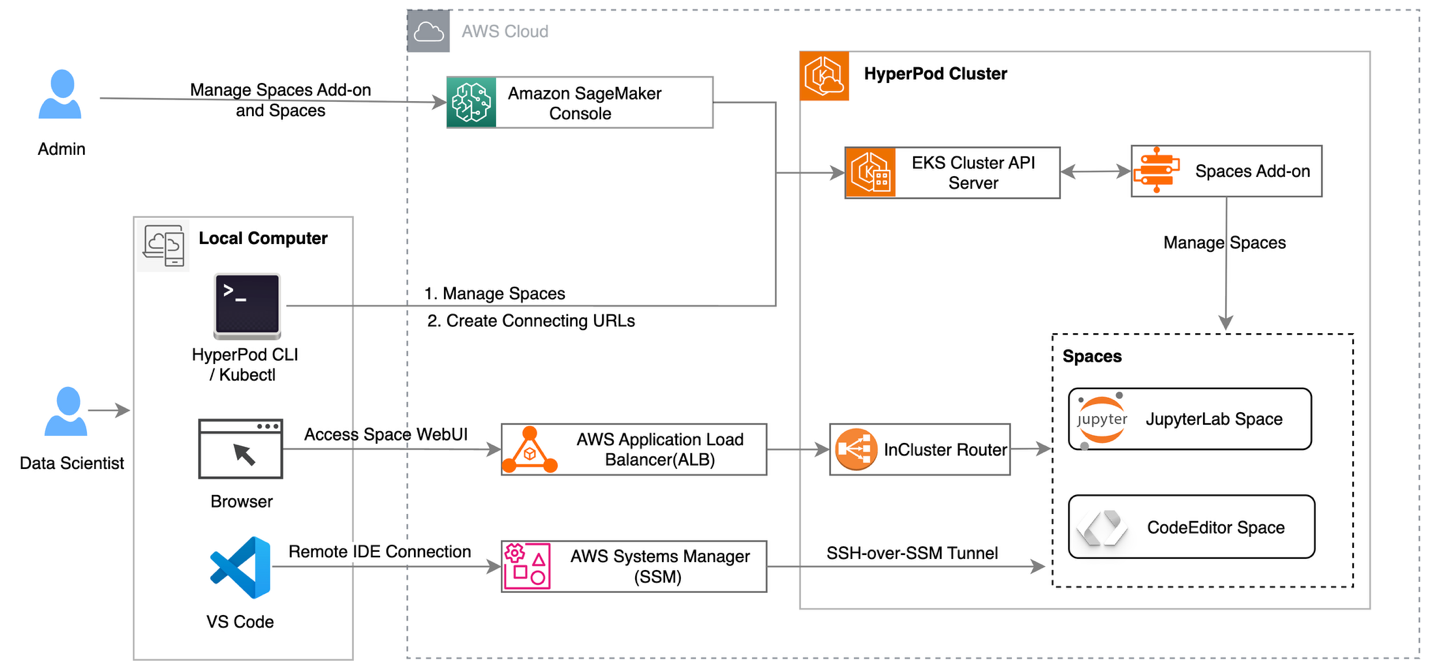
High-level architecture of running Jupyter Notebook on HyperPod cluster
Conclusion
In this post, we explored how Amazon SageMaker HyperPod provides a scalable and cost-efficient infrastructure for running inference workloads. By following the best practices outlined in this post, you can use HyperPod’s capabilities to deploy foundation models by using one-click JumpStart, S3, and FSx for Lustre integration, managed Karpenter autoscaling, and unified infrastructure that dynamically scales from zero to production. With features such as KV caching, intelligent routing, and Multi-Instance GPU support, you can optimize your inference workloads, reducing latency, increasing throughput, and lowering costs by using Spot Instances. By adopting these best practices, you can accelerate your machine learning workflows, improve model performance, and achieve significant total cost of ownership reductions, so that you can scale generative AI responsibly and efficiently in production environments.
About the authors
Author: Vinay Arora