
Build observable enterprise agentic retrieval using Managed Amazon Bedrock Knowledge Base with AWS CloudFormation
Enterprise agentic retrieval solves that: an agent reasons about the question, routes it to the right knowledge base, retrieves iteratively, and returns a cited answer… Once an agent reasons and retrieves in a loop, you can no longer see what it did or whether the answer was any good… Amazon B…
Teams that add Retrieval Augmented Generation (RAG) to a foundation model usually start with a single retrieval step against a single knowledge base. That works until the questions get harder, when the answer spans several sources, or the system has to decide which source to consult before it can respond.
Enterprise agentic retrieval solves that: an agent reasons about the question, routes it to the right knowledge base, retrieves iteratively, and returns a cited answer. But it introduces a harder operational problem. Once an agent reasons and retrieves in a loop, you can no longer see what it did or whether the answer was any good.
A previous post, Build an end-to-end RAG solution using Amazon Bedrock Knowledge Bases and AWS CloudFormation, automated a single-shot RAG workflow with a self-managed (vector-store) Knowledge Base. Amazon Bedrock Knowledge Bases has evolved from RAG to agentic retrieval with the launch of managed knowledge bases. Managed Knowledge Bases agentic retrieval performs multi-turn planning, executes retrieval tools, and generates grounded answers with citations.
This post takes the next step: an enterprise agentic retrieval solution where an agent reasons, retrieves across multiple knowledge bases, and synthesizes a cited answer. It is built on the Amazon Bedrock Managed Knowledge Base and Amazon Bedrock AgentCore, with observability and evaluation built in from the start. You deploy all of it with a single AWS CloudFormation chain.
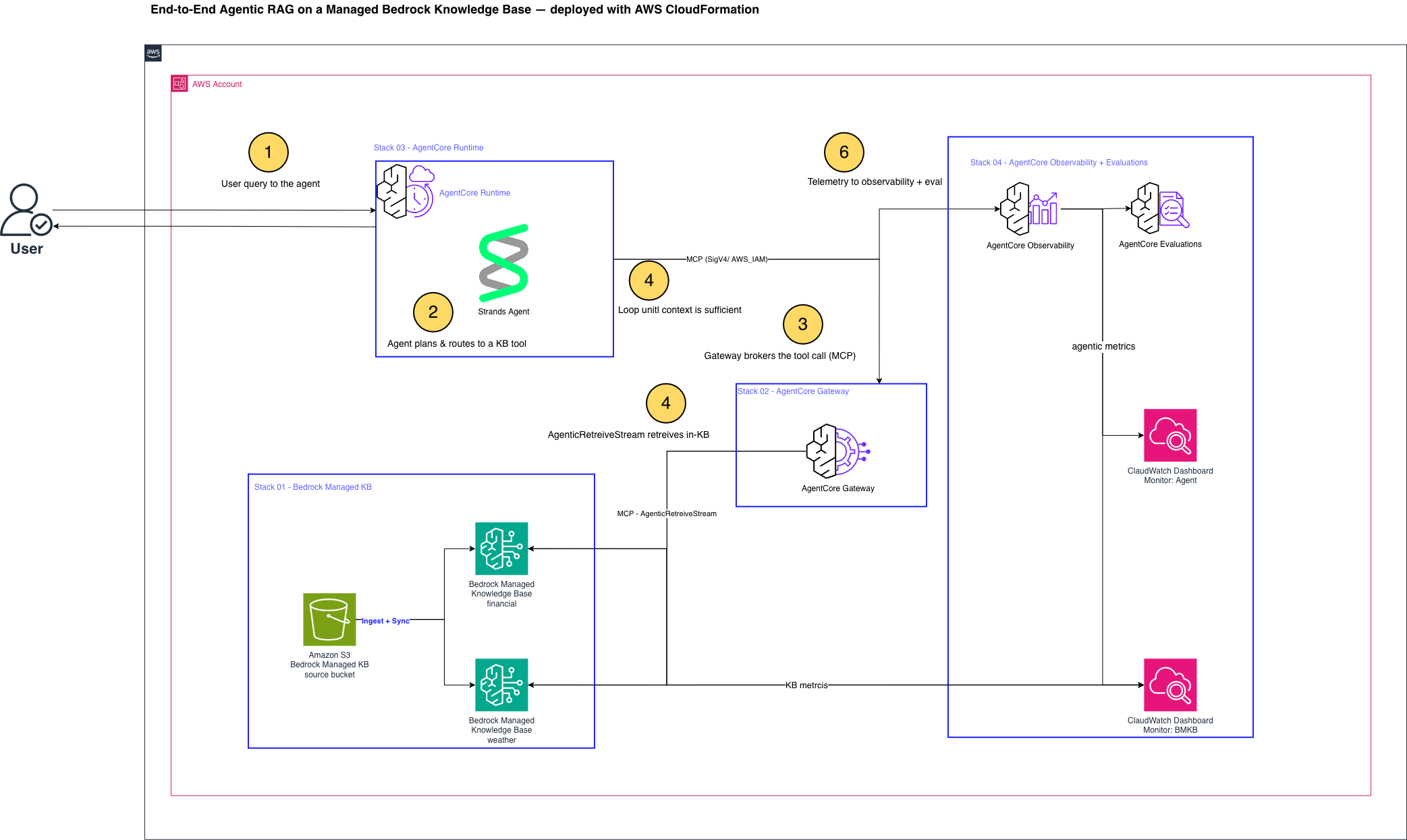
Figure 1: End-to-end architecture from synthetic corpora in Amazon S3 through two Managed Knowledge Bases, the AgentCore Gateway (a capability of Amazon Bedrock AgentCore), and the runtime agent to seven layers of observability and evaluation, all deployed by AWS CloudFormation
The numbered steps in the architecture diagram map to the workflow for the solution, which is as follows:
- A user sends a question to the agent hosted on the Amazon Bedrock AgentCore runtime. The runtime auto-instruments every step with OpenTelemetry spans, so the reason-and-act loop is observable from the first call.
- The agent’s reasoning model plans the task and performs cross-knowledge-base routing: given one retrieval tool per knowledge base, it selects the tool whose topic matches the question (financial or weather).
- The selected tool call is brokered by the Amazon Bedrock AgentCore Gateway over the Model Context Protocol (MCP), which invokes that knowledge base’s
AgenticRetrieveStreamAPI on the Managed Knowledge Base. AgenticRetrieveStreamdoes the within-knowledge-base work: it decomposes the question into sub-queries, retrieves iteratively from the managed datastore (ingested from the corpora in Amazon Simple Storage Service (Amazon S3)), and synthesizes a grounded, cited answer that streams back through the Gateway to the agent.- The agent checks whether the returned context is sufficient. If not, it retrieves again in another loop iteration before composing its final answer. If so, it returns the cited answer to the user.
- Throughout, the runtime emits spans, token usage, and metrics to Amazon CloudWatch and AWS X-Ray, populating the seven observability layers and feeding both the on-demand and continuous evaluation scores.
I. Background
Before the walkthrough, it helps to establish three things: what makes RAG agentic, why the Managed Knowledge Base is the right foundation for it, and why observability and evaluation belong in the design rather than bolted on later.
From RAG to enterprise agentic retrieval
Classic RAG does one retrieval and one generation. Enterprise agentic retrieval puts a reasoning agent in the loop: it decides whether and what to retrieve, can retrieve several times to refine, chooses which knowledge base is relevant (semantic routing), and only then composes a grounded answer with citations. This is exactly what the Amazon Bedrock Managed Knowledge Base now delivers as a first-class capability through its AgenticRetrieveStream API. Retrieval is no longer a single lookup but an agent-driven, multi-step process. That produces better answers on complex questions. But it also produces a more complex system to operate, which is why observability and evaluation are built in from the start in this post.
Managed compared to do-it-yourself Knowledge Bases
Amazon Bedrock now offers a Managed Knowledge Base (Type: MANAGED): Amazon Bedrock manages the ingestion, storage, indexing, and retrieval for you, including embedding and reranking with service-managed models by default, so there is no vector database to provision, scale, or patch.
The following table shows the difference between Amazon Bedrock managed and customer-managed knowledge bases:
| Bedrock Managed | Customer-managed (DIY) |
| Agentic retrieval (AgenticRetrieveStream) |  Supported Supported |  Not supported Not supported |
| AgentCore Gateway integration | Supported | Not supported |
| Data store | Auto scaling, fully managed by Amazon Bedrock | You provision, scale, and maintain it |
| Embedding + reranking | Built-in managed models (you can select other models available on Amazon Bedrock) | You configure them |
| Infrastructure to manage | None | Vector DB + more |
Why observability and evaluation
An agentic system that “returns an answer” is not enough for production. You need to see how it behaves (latency, call volume, token usage), how good the retrieval and answers are, and you need those signals continuously. This solution ships two CloudWatch dashboards spanning seven layers of telemetry, plus two forms of evaluation (on-demand and continuous), all provisioned by the same templates.
II. Solution overview
The solution deploys as four native AWS CloudFormation stacks, each wiring its outputs into the next.
01-knowledge-basescreates an Amazon Simple Storage Service (Amazon S3) bucket, two Managed Knowledge Bases (a financial and a weather corpus, so the agent has something to route between), their data sources and IAM, and an ingestion custom resource that uploads the documents and runs the first sync.02-agentic-gatewaystands up an Amazon Bedrock AgentCore Gateway (AWS_IAMauth, MCP) with a per-knowledge-base target built on the nativebedrock-knowledge-basesconnector, so each knowledge base exposes its ownAgenticRetrieveStreamtool with no AWS Lambda function or extra container.03-agent-runtimeprovisions an Amazon Elastic Container Registry (Amazon ECR) repository and an AWS CodeBuild project that builds an OpenTelemetry-instrumented Strands agent image, the Amazon Bedrock AgentCore runtime that hosts it, the log and trace delivery wiring, and the online evaluation configuration.04-dashboardscreates the two Amazon CloudWatch dashboards.
Routing happens at two levels, and it is worth separating them. The agent’s reasoning model does the cross-knowledge-base routing. Given one retrieval tool per knowledge base and a system prompt to pick the tool matching the question’s topic, it decides which knowledge base to consult. The AgenticRetrieveStream API then does the within-knowledge-base work, decomposing the question into sub-queries, retrieving iteratively, and synthesizing a cited answer. So the agent runs a reason-and-act loop. It makes a large language model (LLM) call, decides which knowledge base tool to call, reads what came back through the Gateway, and often retrieves again before composing its final, cited answer. Every step is auto-instrumented by the runtime, so the seven observability layers fill from real traffic.
The seven layers each answer a different operational question, and together they cover the agent end to end. Layers 1, 4, and 5 are emitted automatically. Layers 3, 6, and 7 are published as custom metrics by the driver notebook.
| Layer | What it captures | Operational question it answers |
| L1 — KB-native metrics | Retrieve invocations, errors, throttles per KB | Is each knowledge base healthy and serving traffic? |
| L2 — Ingestion | Ingestion job status and per-document results | Did my documents make it into the knowledge base? |
| L3 — Agentic retrieval quality | Reference-free utilization, grounded coverage, duplicate rate | Is the agent retrieving relevant, well-grounded context? |
| L4 — Gateway / MCP metrics | Gateway tool-call volume and latency | Is the retrieval tool layer fast and reliable? |
| L5 — OTEL span tree | The agent’s full reason-and-act span trace | What did the agent actually do, step by step? |
| L6 — Token usage | gen_ai.usage tokens per session and model | What is each query costing in tokens? |
| L7 — Evaluation scores | Correctness, faithfulness, tool-selection, response relevance | Are the answers actually good? |
Why these services
Each choice in this solution follows from the goal of enterprise agentic retrieval that you can operate. The Managed Knowledge Base is the foundation because agentic retrieval and the AgentCore Gateway connector are available only on it. It also removes the vector database you would otherwise provision, scale, and patch. The AgentCore Gateway exposes each knowledge base’s AgenticRetrieveStream as an MCP tool, so the agent gets one tool per knowledge base with no Lambda or extra container to maintain. The AgentCore runtime hosts the agent and auto-emits OpenTelemetry spans, which is what makes Layers 5 through 7 possible without extra wiring. CloudFormation ties it together into one reproducible chain, so the whole system, including the dashboards and continuous evaluation, comes up the same way every time.
III. Describe the dataset
The solution ships with two small synthetic corpora, bundled in the repository under data/:
- Financial: A synthetic Octank Financial 10-K (
octank_financial_10K.pdf, ~198 KB). - Weather: A real, publicly available U.S. Congressional Research Service report on tornadoes (IF12695,
tornadoes_report.pdf, ~560 KB).
The two corpora are intentionally distinct, so the agent must route each question to the right knowledge base, which is the semantic-routing story. We use two separate knowledge bases rather than one knowledge base with two data sources on purpose. Each knowledge base is exposed as its own retrieval tool, so the agent makes a real routing decision between them. Every per-knowledge-base signal on the dashboards (index size, retrieval quality, token usage, and evaluation scores, all keyed by KnowledgeBaseId) stays cleanly separable.
A single knowledge base with two data sources would give the agent only one tool, with no routing to demonstrate and the per-corpus signals merged. Because these are Managed Knowledge Bases, we do not configure chunking, embedding, or an index. On ingestion, Amazon Bedrock parses each PDF, chunks it, embeds it with its managed model, and indexes it automatically.
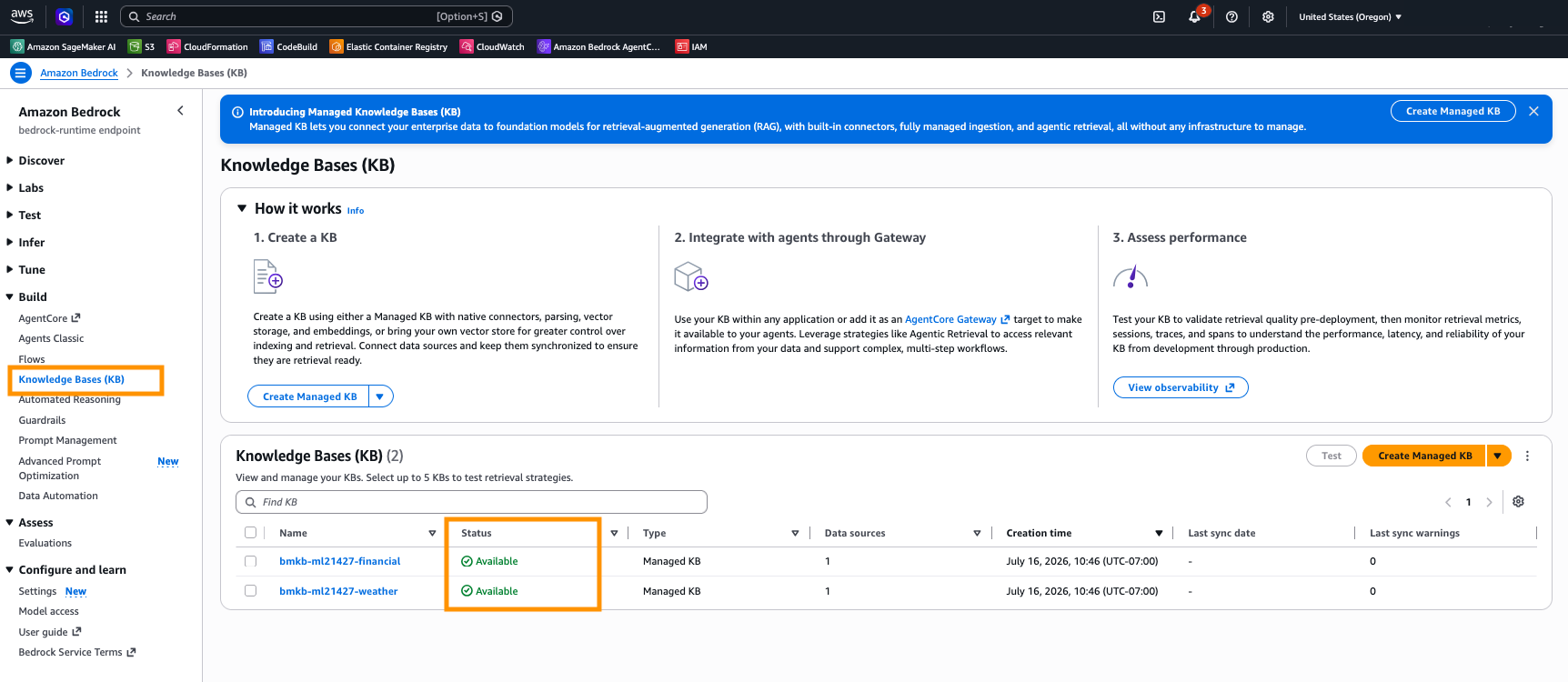
Figure 2: Managed ingestion scans, chunks, embeds, and indexes each document automatically, with one document indexed per knowledge base and zero failures
IV. Deploy the solution
Deploying the solution takes one command, but it helps to know what that command needs and what it produces. This section covers the prerequisites, the single deploy script, and how to confirm every stack came up.
Prerequisites
- An AWS account with permissions for Amazon Bedrock, Amazon Bedrock AgentCore runtime and Amazon Bedrock AgentCore Gateway, AWS Identity and Access Management (IAM), Amazon CloudWatch, AWS X-Ray, Amazon ECR, AWS CodeBuild, Amazon Simple Storage Service (Amazon S3), AWS Lambda, and AWS CloudFormation. You also need Amazon Bedrock model access enabled for the agent’s model.
- The agent’s model available in the account (default
us.anthropic.claude-haiku-4-5-20251001-v1:0). See Supported foundation models in Amazon Bedrock. - CloudWatch Transaction Search enabled, so OpenTelemetry spans land in
aws/spansfor Layers 5–7. See CloudWatch Transaction Search. - AWS Command Line Interface (AWS CLI) v2. Python 3.13 with
boto3>=1.43for the notebook. No local Docker (the agent image is built by CodeBuild). See Install the AWS CLI and Boto3 documentation.
One command
When the prerequisite steps are complete, you’re ready to set up the solution:
- Clone the GitHub repository containing the solution files:
- Navigate to the solution directory:
- Run the sh script, which will create the deployment bucket, prepare the CloudFormation templates, and upload the ready CloudFormation templates and required artifacts to the deployment bucket:
The script deploys the four stacks in order and reports each stage, wiring outputs forward and printing a live verification line so you can watch the solution come up:
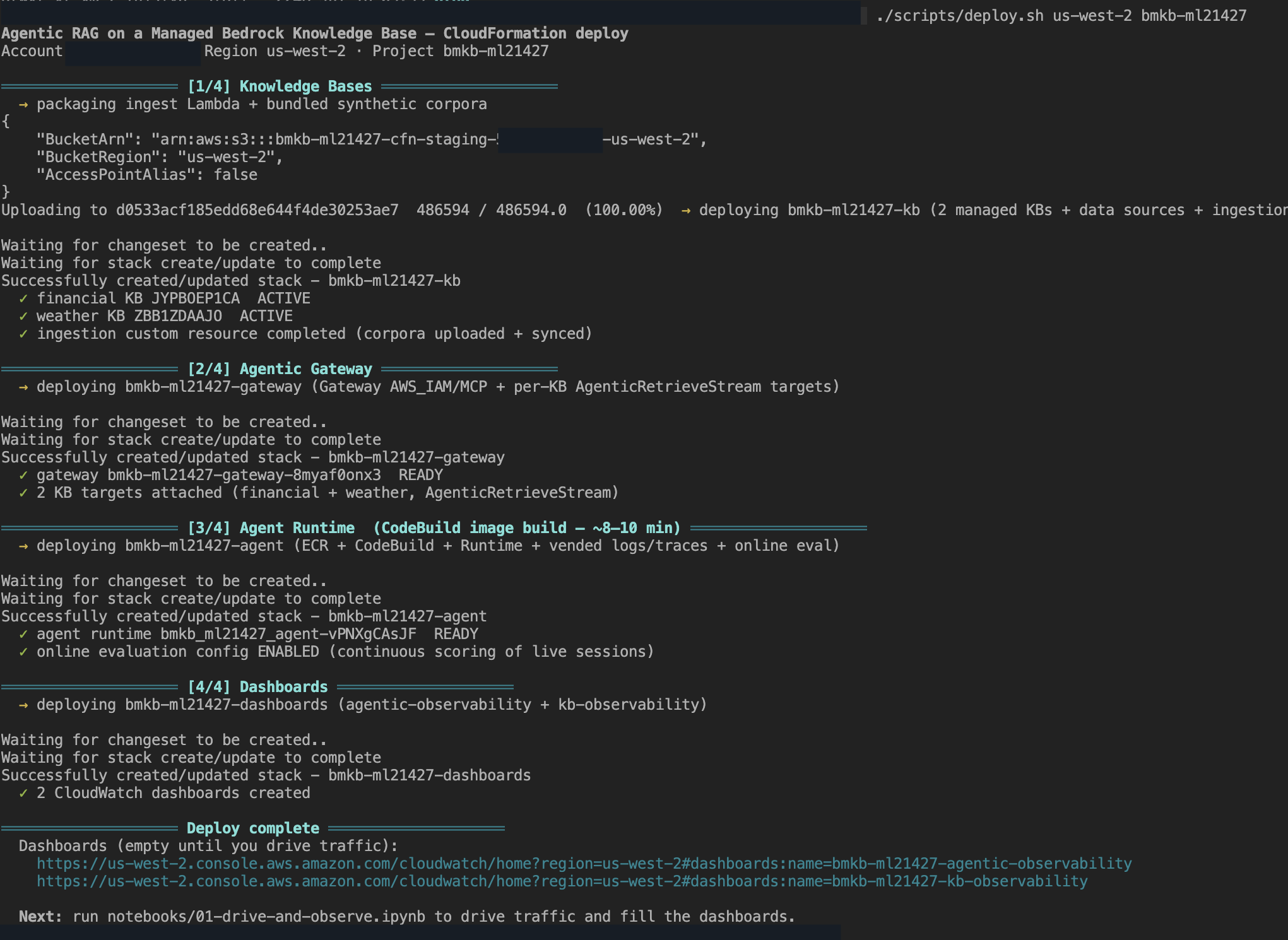
Figure 3: The deploy script reports each stage, knowledge bases active and ingested for both knowledge bases, gateway and targets ready, agent runtime ready with continuous evaluation enabled, and the two dashboards, then prints the dashboard URLs
Stack 03-agent-runtime builds the agent container with CodeBuild, so allow roughly 8–10 minutes for that stage.
When it finishes, all four stacks are CREATE_COMPLETE:
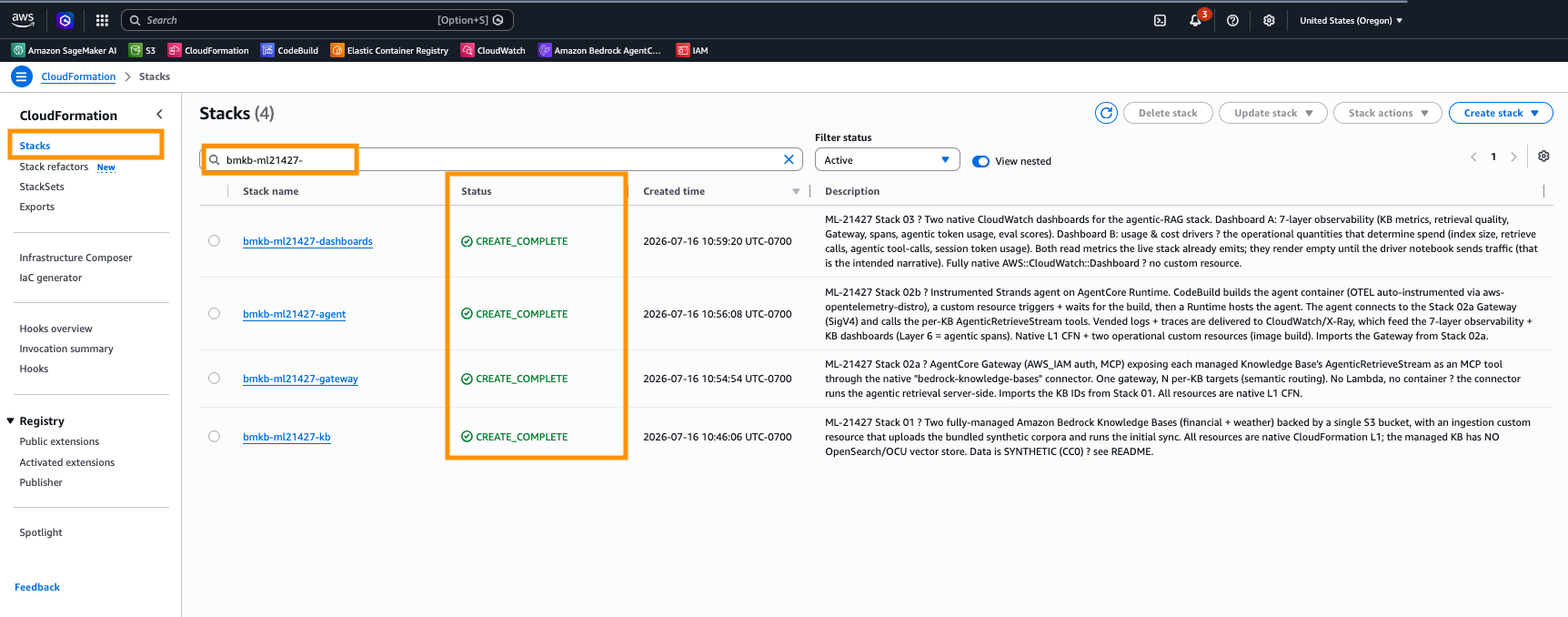
Figure 4: The four stacks (knowledge-bases, gateway, agent, dashboards) all reach CREATE_COMPLETE
V. Launch and test
Deploying is only half the story. You then drive traffic through the agent to see routing and light up the dashboards. Those step-by-step instructions live in the sample’s README (“Launch and test — drive traffic and observe”), which walks through the accompanying notebook. It sends per-knowledge-base prompts, shows how each question routes to the right knowledge base, and publishes the Layer 3, 6, and 7 metrics. See 07-IaaC/managed-kb-observability-cfn/README.md.
VI. Observe: The seven-layer dashboards
The two dashboards are where the seven layers become visible. The stack creates both, and driving traffic populates them.
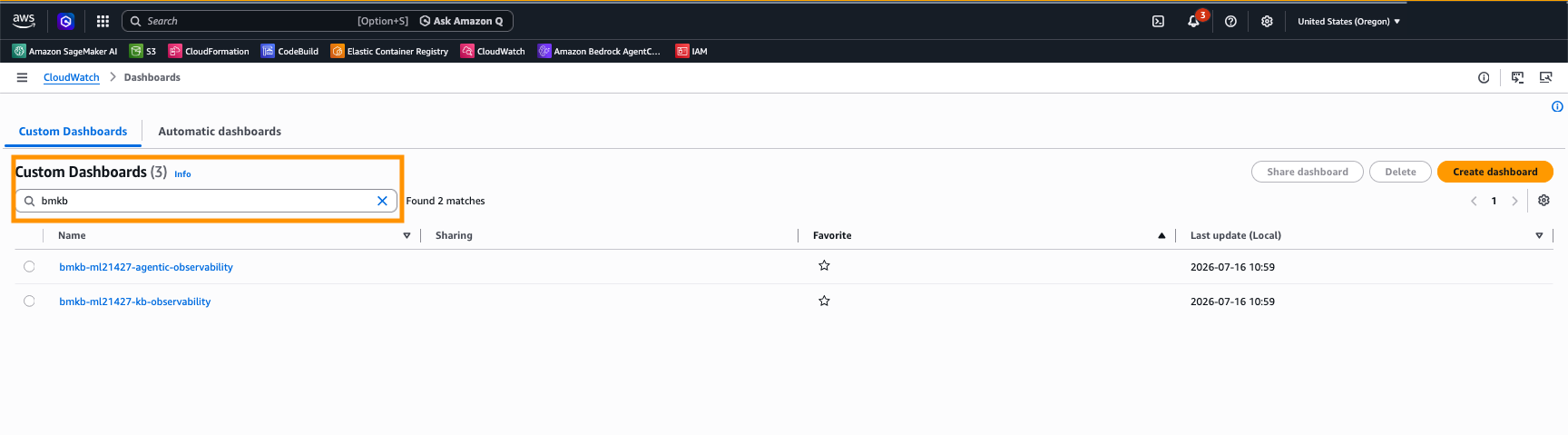
Figure 5: The two dashboards the stack provisions, end-to-end agentic observability and per-knowledge-base observability
Dashboard A, agentic observability (end to end). The board opens with an explainer of how each layer counts a different thing. For N queries you see about N agent invocations, 2N retrievals, 3N LLM calls, and 5N Gateway MCP operations, the agentic loop made visible. It then shows knowledge base metrics (L1), Gateway metrics and latency (L4), token usage (L6), and the reference-free Layer 3 quality signals, defined inline and plotted per knowledge base. The Layer 3 signals are reference-free because the agent uses AgenticRetrieveStream, which returns a synthesized, cited answer rather than per-chunk scores.
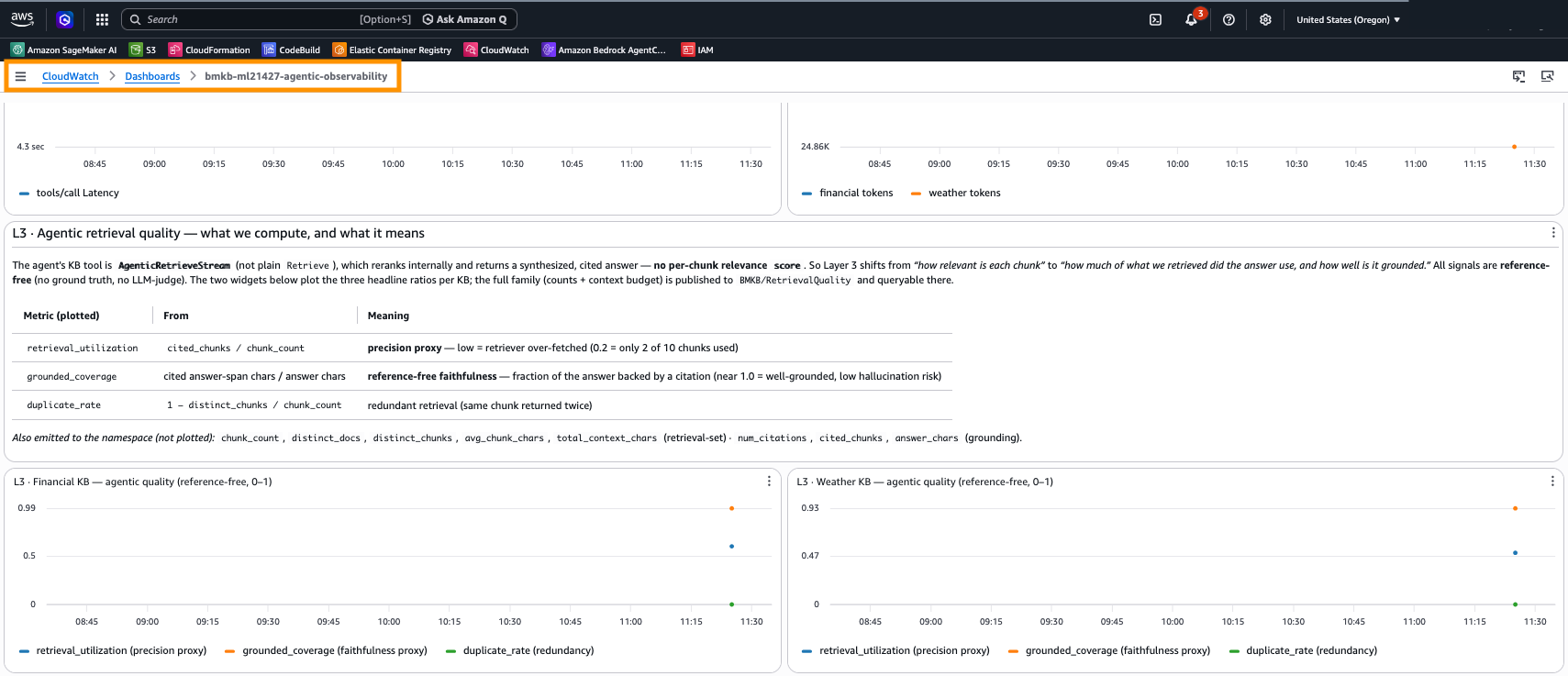
Figure 6: Dashboard A showing the Layer 3 explainer above the two per-knowledge-base retrieval-quality widgets, with Gateway latency and token usage alongside
Dashboard B, per-knowledge-base (BMKB) observability. The operational signals that also determine spend, per knowledge base: index size (from Amazon S3 source bytes), retrieve volume, agentic tool-calls, session token usage, and generation token usage by model, each with an inline explanation.
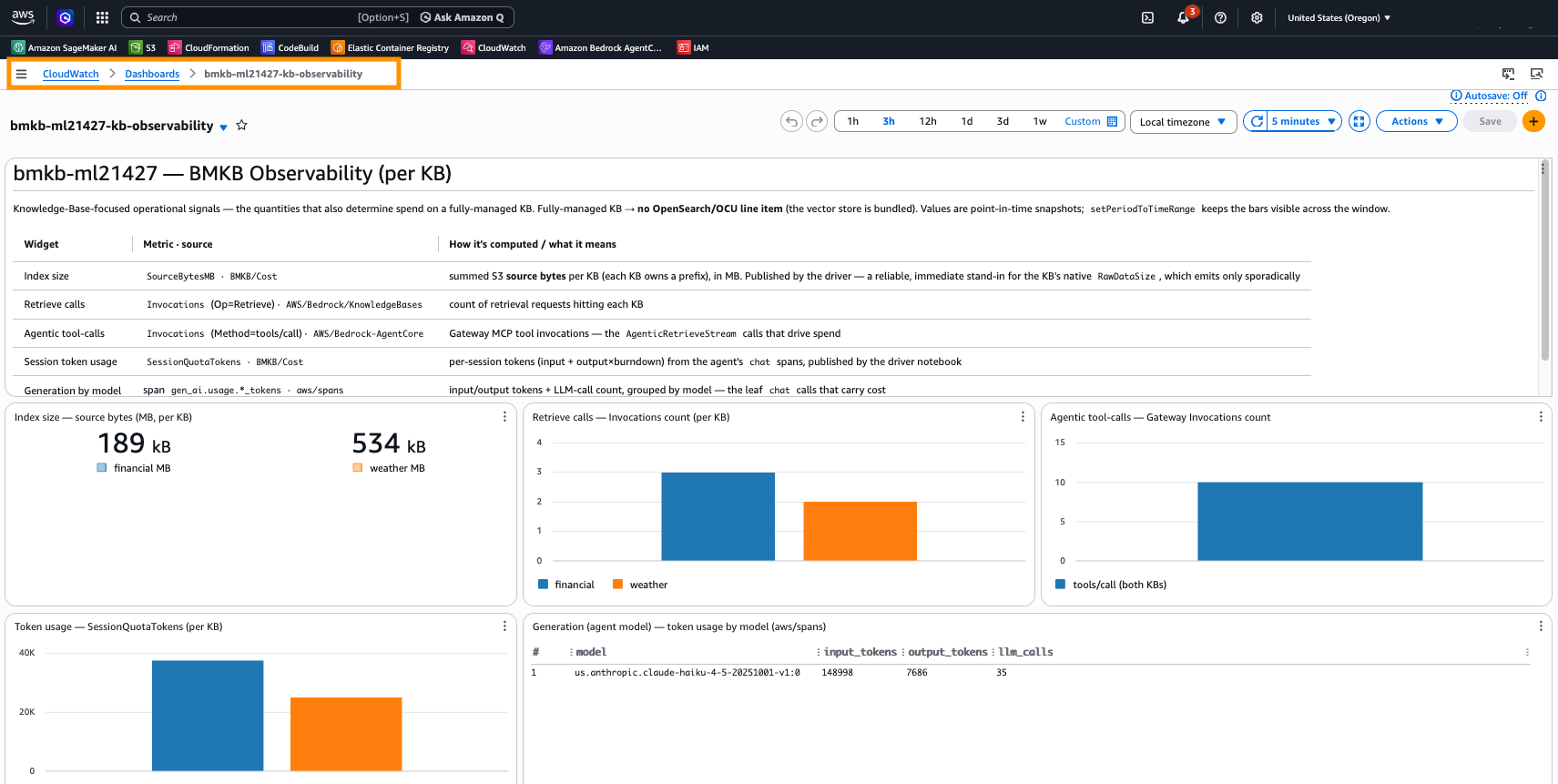
Figure 7: The per-knowledge-base observability dashboard populated with index size, retrieve calls, agentic tool-calls, token usage, and generation by model
VII. Evaluate: On-demand and continuous
Quality is measured two ways, and both are provisioned by the stack.
On-demand. The driver notebook calls AgentCore Evaluate (LLM-as-judge) over each session’s spans for built-in evaluators (Correctness, Faithfulness, Tool-Selection Accuracy) and publishes the scores to CloudWatch, where they appear as Layer 7 on Dashboard A.
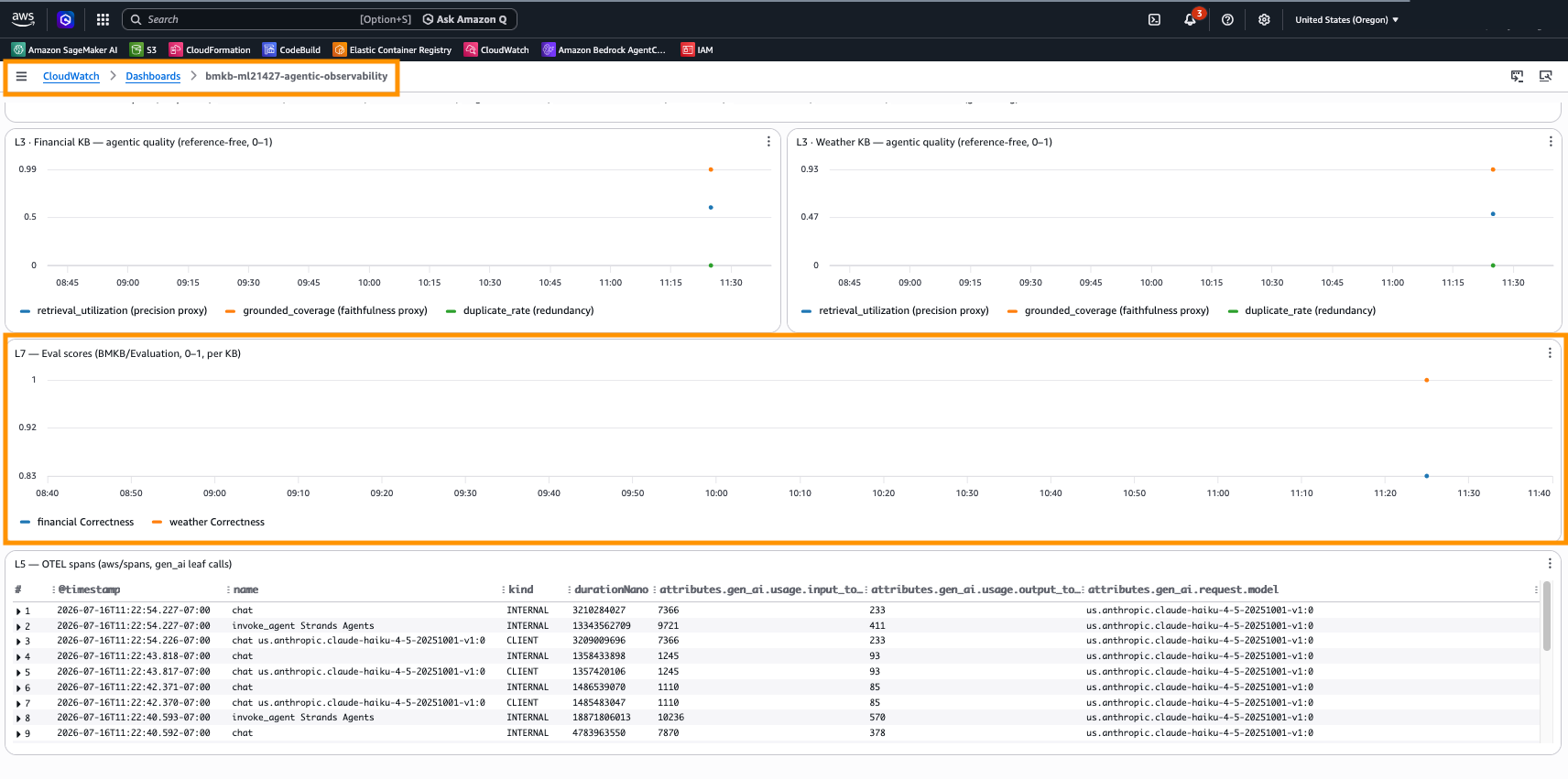
Figure 8: Layer 7 on Dashboard A, on-demand evaluation scores (Correctness) per knowledge base, with the Layer 5 OpenTelemetry span table carrying gen_ai.usage tokens
Continuous (online). Stack 03-agent-runtime also provisions an AWS::BedrockAgentCore::OnlineEvaluationConfig that samples live sessions and scores them automatically. The results appear on the console under CloudWatch, GenAI Observability, Bedrock AgentCore, Evaluations, with no notebook run required. The configuration view lists the evaluators and how many results each has scored:
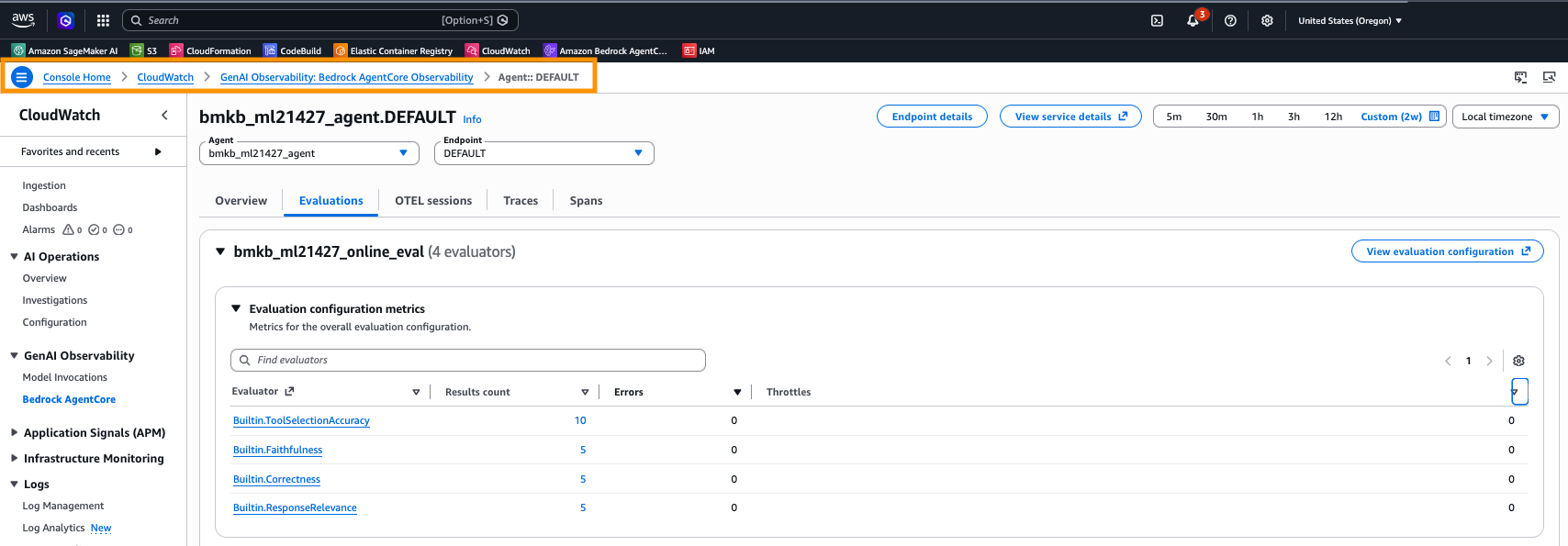
Figure 9: The bmkb_ml21427_online_eval configuration scoring live sessions with four built-in evaluators (Tool-Selection Accuracy, Faithfulness, Correctness, Response Relevance) and zero errors
Drilling in shows the average scores and per-trace breakdown across those evaluators:
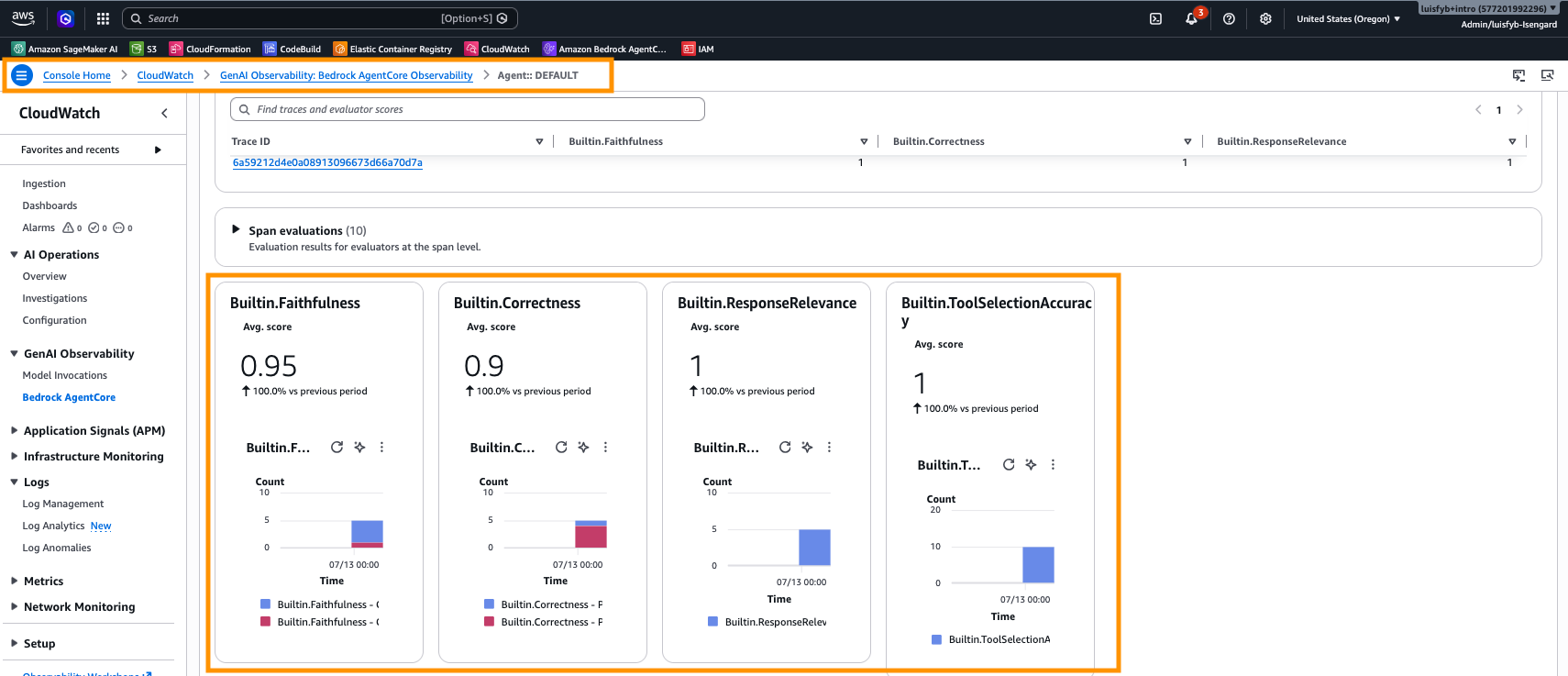
Figure 10: Continuous scores from the same configuration, Faithfulness 0.95, Correctness 0.9, Response Relevance 1.0, and Tool-Selection Accuracy 1.0, with the per-span evaluation detail
 Sampling and cost. This solution sets
 SamplingPercentage: 100 purely for the blog experiment, so every session is scored and results are immediately visible. This is not a production recommendation. Online evaluation invokes an LLM-as-judge per sampled session, so cost scales with the sampling rate and traffic volume. For a real deployment, choose a sampling percentage that fits your quality-monitoring needs and budget, and align the configuration with your organization’s own policies and cost-governance requirements before enabling it. The rate is a single property (OnlineEvaluationConfig.Rule.SamplingConfig.SamplingPercentage) in templates/03-agent-runtime.yaml.
When to use which. On-demand evaluation fits development and pre-release checks. You run it deliberately over a chosen set of sessions when you want a quality read on demand, and you pay only when you run it. Continuous (online) evaluation fits production monitoring. It samples live traffic and scores it automatically, so quality regressions surface without anyone kicking off a job, at a cost that scales with the sampling rate. A common pattern is to lean on on-demand evaluation while iterating, then enable continuous evaluation at a modest sampling percentage once the agent is serving real users.
VIII. Clean up
Tear everything down in reverse order with one command:

Figure 11: The cleanup script deletes the four stacks in reverse dependency order
IX. Conclusion
We built a complete agentic retrieval solution on a managed Amazon Bedrock Knowledge Base and AgentCore (multi-KB semantic routing, a reasoning agent, seven layers of observability, and both on-demand and continuous evaluation) and deployed all of it with a single AWS CloudFormation chain. Using the Managed Knowledge Base removed the vector-store infrastructure entirely and added agentic retrieval and the AgentCore Gateway connector, which a customer-managed knowledge base does not offer.
This pattern fits workloads where the right answer lives in more than one place and the system has to choose where to look. Examples include a support assistant that routes between a product-docs knowledge base and a billing knowledge base, a research assistant spanning separate regulatory and scientific corpora, or an internal helpdesk that keeps HR, IT, and finance content in isolated knowledge bases for access and cost separation. In each case the agent routes across knowledge bases, agentic retrieval does the multi-step work within one, and the seven layers show how well it is working and what it costs.
From here you can point the data sources at your own corpora, place the agent in a virtual private cloud (VPC), tune the online-evaluation sampling rate to your budget and policies, or add more knowledge bases to the router. The templates, the driver notebook, and the self-contained utilities are all in the accompanying repository.
About the authors
Author: Luis Felipe Yepez Barrios