

Building custom model provider for Strands Agents with LLMs hosted on SageMaker AI endpoints
However, this flexibility introduces a critical technical challenge: response format incompatibility with Strands agents… While these custom serving frameworks typically return responses in OpenAI-compatible formats to facilitate broad environment support, Strands agents expect model responses al…
Organizations increasingly deploy custom large language models (LLMs) on Amazon SageMaker AI real-time endpoints using their preferred serving frameworks—such as SGLang, vLLM, or TorchServe—to help gain greater control over their deployments, optimize costs, and align with compliance requirements. However, this flexibility introduces a critical technical challenge: response format incompatibility with Strands agents. While these custom serving frameworks typically return responses in OpenAI-compatible formats to facilitate broad environment support, Strands agents expect model responses aligned with the Bedrock Messages API format.
The challenge is particularly significant because support for the Messages API is not guaranteed for the models hosted on SageMaker AI real-time endpoints. While Amazon Bedrock Mantle distributed inference engine has supported OpenAI messaging formats since December 2025, flexibility of SageMaker AI allows customers to host various foundation models—some requiring esoteric prompt and response formats that don’t conform to standard APIs. This creates a gap between the serving framework’s output structure and what Strands expects, preventing seamless integration despite both systems being technically functional. The solution lies in implementing custom model parsers that extend SageMakerAIModel and translate the model server’s response format into what Strands expects, enabling organizations to leverage their preferred serving frameworks without sacrificing compatibility with the Strands Agents SDK.
This post demonstrates how to build custom model parsers for Strands agents when working with LLMs hosted on SageMaker that don’t natively support the Bedrock Messages API format. We’ll walk through deploying Llama 3.1 with SGLang on SageMaker using awslabs/ml-container-creator, then implementing a custom parser to integrate it with Strands agents.
Strands Custom Parsers
Strands agents expect model responses in a specific format aligned with the Bedrock Messages API. When you deploy models using custom serving frameworks like SGLang, vLLM, or TorchServe, they typically return responses in their own formats—often OpenAI-compatible for broad environment support. Without a custom parser, you’ll encounter errors like:
TypeError: 'NoneType' object is not subscriptable
This happens because the Strands Agents default SageMakerAIModel class attempts to parse responses assuming a specific structure that your custom endpoint doesn’t provide. In this post and the companion code base, we illustrate how to extend the SageMakerAIModel class with custom parsing logic that translates your model server’s response format into what Strands expects.
Implementation Overview
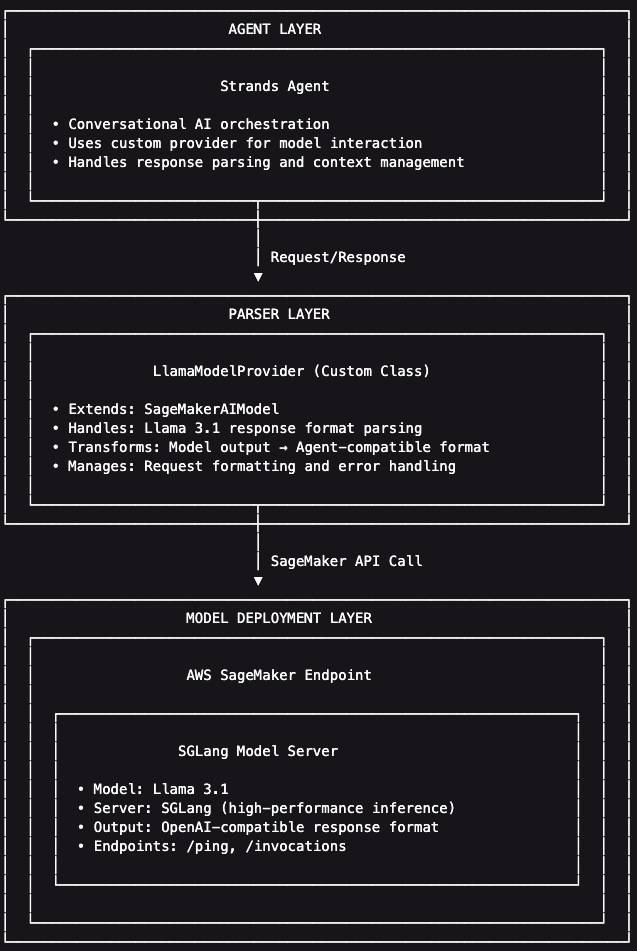
Our implementation consists of three layers:
- Model Deployment Layer: Llama 3.1 served by SGLang on SageMaker, returning OpenAI-compatible responses
- Parser Layer: Custom
LlamaModelProviderclass that extendsSageMakerAIModelto handle Llama 3.1’s response format - Agent Layer: Strands agent that uses the custom provider for conversational AI, appropriately parsing the model’s response

We start by using awslabs/ml-container-creator, an AWS Labs open-source Yeoman generator that automates the creation of SageMaker BYOC (Bring Your Own Container) deployment projects. It generates the artifacts needed to build LLM serving containers, including Dockerfiles, CodeBuild configurations, and deployment scripts.
Install ml-container-creator
The first step we need to take is to build the serving container for our model. We use an open-source project to build the container and generate deployment scripts for that container. The following commands illustrate how to install awslabs/ml-container-creator and its dependencies, which include npm and Yeoman. For more information, review the project’s README and Wiki to get started.
Generate Deployment Project
Once installed and linked, the yo command allows you to run installed generators, yo ml-container-creator allows you to run the generator we need for this exercise.
The generator creates a complete project structure:
Build and Deploy
Projects built by awslabs/ml-container-creator include templatized build and deployment scripts. The ./deploy/submit_build.sh and ./deploy/deploy.sh scripts are used to build the image, push the image to Amazon Elastic Container Registry (ECR), and deploy to an Amazon SageMaker AI real-time endpoint.
The deployment process:
- CodeBuild builds the Docker image with SGLang and Llama 3.1
- Image is pushed to Amazon ECR
- SageMaker creates a real-time endpoint
- SGLang downloads the model from HuggingFace and loads it into GPU memory
- Endpoint reaches InService status (approximately 10-15 minutes)
We can test the endpoint by using ./test/test_endpoint.sh, or with a direct invocation:
Understanding the Response Format
Llama 3.1 returns OpenAI-compatible responses. Strands expects model responses to adhere to the Bedrock Messages API format. Until late last year, this was a standard compatibility mismatch. Since December 2025, the Amazon Bedrock Mantle distributed inference engine supports OpenAI messaging formats:
However, support for the Messages API is not guaranteed for the models hosted on SageMaker AI real-time endpoints. SageMaker AI allows customers to host many kinds of foundation models on managed GPU-accelerated infrastructure, some of which may require esoteric prompt/response formats. For example, the default SageMakerAIModel uses the legacy Bedrock Messages API format and attempts to access fields that don’t exist in the standard OpenAI Messages format, causing TypeError style failures.
Implementing a Custom Model Parser
Custom model parsers are a feature of the Strands Agents SDK that provides strong compatibility and flexibility for customers building agents powered by LLMs hosted on SageMaker AI. Here, we describe how to create a custom provider that extends SageMakerAIModel:
The stream method overrides the behavior of the SageMakerAIModel and allows the agent to parse responses based on the requirements of the underlying model. While the vast majority of models do support OpenAI’s Message API protocol, this capability enables power-users to leverage highly specified LLMs on SageMaker AI to power agent workloads using Strands Agents SDK. Once the custom model response logic is built, Strands Agents SDK makes it simple to initialize agents with custom model providers:
The complete implementation for this custom parser, including the Jupyter notebook with detailed explanations and the ml-container-creator deployment project, is available in the companion GitHub repository.
Conclusion
Building custom model parsers for Strands agents helps users to leverage different LLM deployments on SageMaker, regardless of its response format. By extending SageMakerAIModel and implementing the stream() method, you can integrate custom-hosted models while maintaining the clean agent interface of Strands.
Key takeaways:
- awslabs/ml-container-creator simplifies SageMaker BYOC deployments with production-ready infrastructure code
- Custom parsers bridge the gap between model server response formats and Strands expectations
- The stream() method is the critical integration point for custom providers
About the authors
 Dan Ferguson is a Sr. Solutions Architect at AWS, based in New York, USA. As a machine learning services expert, Dan works to support customers on their journey to integrating ML workflows efficiently, effectively, and sustainably.
Author: Dan Ferguson