

Create Notion Page Summaries from URLs with Snapshot Site and Slack Alerts
Do that on autopilot for a few months and your Notion archive quietly fills with confident summaries of pages that were never actually there — and nobody notices until someone cites one… That failure mode is the reason our newest template on the n8n gallery, Create Notion Page Summaries from UR…
An AI summariser will never tell you it had nothing to work with. Point one at a page that rendered blank, or at a CAPTCHA interstitial, or at a soft 404, and it will still return a fluent paragraph. It just won’t be about your content. Do that on autopilot for a few months and your Notion archive quietly fills with confident summaries of pages that were never actually there — and nobody notices until someone cites one.
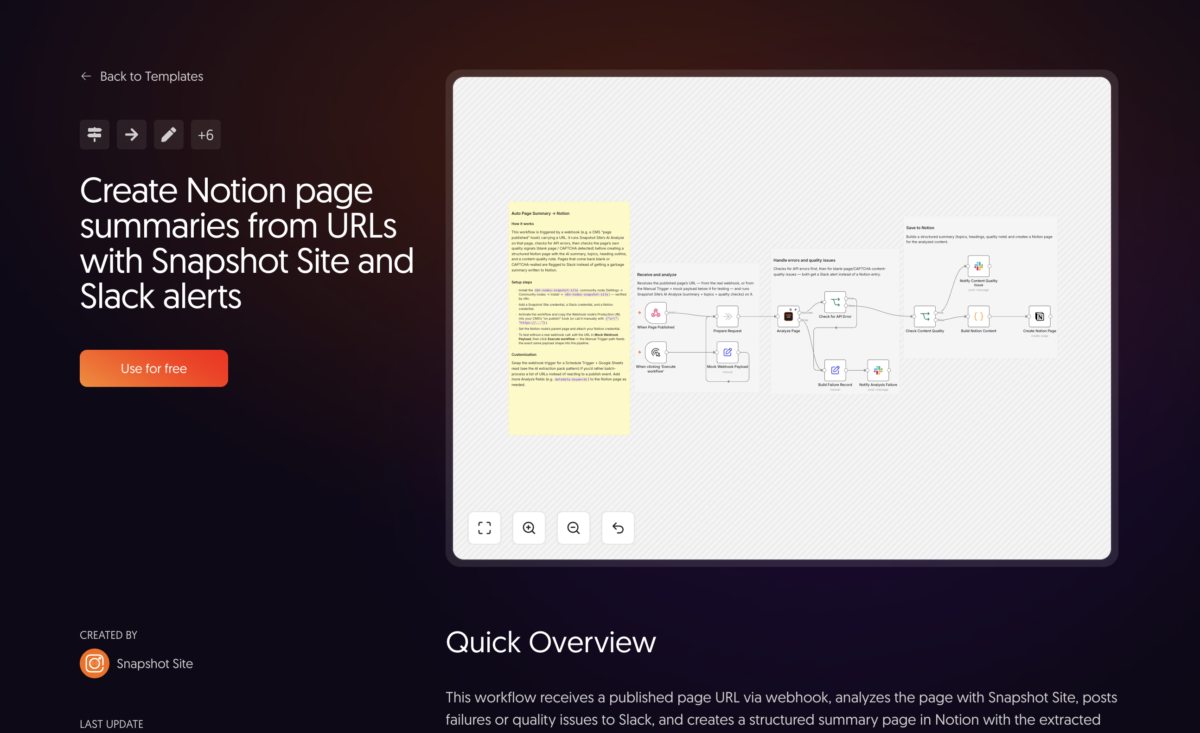
That failure mode is the reason our newest template on the n8n gallery, Create Notion Page Summaries from URLs with Snapshot Site and Slack Alerts, spends about half its nodes on things that are not summarising. We covered the idea in Auto-Summarize Web Pages into Notion with the Analyze API — feed in a URL, get a Notion entry. This is the version you can import, with the guardrails that turned out to matter once the loop runs unattended.
A publish event, not a batch job
The older write-up described a schedule or an RSS feed walking a list of URLs. This template is wired the other way round: it starts at a Webhook node listening for POST /page-published, expecting a body of {"url": "https://..."}.
The intended source is your CMS’s “page published” hook. Someone hits publish, the CMS calls the webhook, and a few seconds later there’s a Notion entry for the page that just went live. Nothing polls, nothing re-reads a spreadsheet, and there’s no window where a page exists but hasn’t been catalogued yet. If your CMS can’t call a webhook, the template’s sticky notes point at the alternative — swap the trigger for a Schedule Trigger reading URLs from a sheet — but the shipped default is event-driven on purpose.
Both entry points converge on a small Prepare Request no-op node before anything else runs. That’s not decoration: it gives every downstream node a single, stable place to read the requested URL from, no matter which trigger fired.
The Analyze call, configured for archives
Analyze Page is a single Snapshot Site node running operation: analyze with three options set:
fullSize: true— analyse the whole scrollable page rather than the first viewport. On a long article, the headings and topics that best describe the piece are usually well below the fold.enableSummary: true— populatessummaryandtopicsin the response.enableQuality: true— populatesquality.isBlank,quality.hasCaptcha,quality.httpStatus, andquality.readabilityScore.
The node also carries retryOnFail with 3 tries five seconds apart, and onError: continueErrorOutput. Those two settings do different jobs. The retry absorbs the transient stuff — a slow origin, a blip — without anyone hearing about it. The error output means that when all three tries fail, the workflow doesn’t halt; execution continues down a second branch that exists specifically to handle the failure. A pipeline that stops dead on the first bad URL is a pipeline you’ll find broken three days later.
That single call is doing the same job described in Turn Any Rendered Web Page Into Structured Data With the Analyze API — one request returns the render plus the derived structure, so there’s no separate scrape, parse, or model-calling step to maintain.
Two escape hatches before Notion
Here’s the part worth copying even if you never use Notion. Between the analyze call and the write, there are two gates, and each has its own Slack destination.
Gate one: did the API call fail? An IF node checks for an error, and both it and the node’s error output feed a Build Failure Record Set node. That node pulls the requested URL from the common Prepare Request convergence point and the message from the error payload, then posts to #content-ops-alerts. This is an infrastructure alert — bad credentials, an unreachable host, a URL your CMS mangled — and it belongs with whoever owns the plumbing.
Gate two: did the page come back empty or blocked? A second IF evaluates quality.isBlank === true || quality.hasCaptcha === true. If either is true, the run posts to #content-quality with the offending URL, which condition tripped, and the quality.httpStatus value — and then stops. No Notion page is created.
That last clause is the whole thesis. The call technically succeeded. There’s a summary string sitting right there in the response, ready to be written. The template throws it away, because a summary of a blank render is worse than no entry at all: an empty slot in the archive is obviously an empty slot, whereas a plausible paragraph about nothing is indistinguishable from real work.
Splitting the alerts across two channels matters too. A blank or CAPTCHA-walled result on your own freshly published page is rarely an API problem — it’s usually a staging URL that leaked into the hook, a page behind auth, an origin returning a 403 to non-browser traffic, or bot protection that’s started reacting to automated requests. The httpStatus in the message is normally enough to tell those apart, and the reasoning in How to Get Reliable Screenshots of Bot-Protected Pages covers what to do when the last one is the answer. Those alerts need a content or web owner, not an on-call engineer, which is exactly why they don’t share a channel with the API failures.