

Cyber resilience on AWS: A reference approach for recovery from ransomware and destructive events
Cyber resilience is the ability to recover workloads to a known-good state after an adversary has affected the environment… Cyber resilience focuses on recovery: restoring a trustworthy environment when backups, credentials, or parts of the infrastructure can no longer be assumed to be safe… Fo…
Cyber resilience is the ability to recover workloads to a known-good state after an adversary has affected the environment. Prevention works to keep threat actors out and detection works to find them quickly. Cyber resilience focuses on recovery: restoring a trustworthy environment when backups, credentials, or parts of the infrastructure can no longer be assumed to be safe.
For organizations running critical workloads on AWS, ransomware, data extortion, and other destructive events are increasingly central to recovery planning. The recovery environment and backups that recovery strategies depend on could themselves be targets of these events. This post is written for teams building recovery capabilities for these scenarios.The post walks through a reference pattern for isolating recovery from production, describes how AWS Backup logically air-gapped vaults provide deletion-protected backup storage, and presents a validation pipeline that checks whether a backup is recoverable and safe to use. It then lays out a concrete recovery workflow with parallelizable stages, introduces the Rebuild-Restore-Rotate framework for deciding what to recover from code, from backup, or to generate fresh, and addresses how to select the right recovery point when the most recent backup might carry the same threat that triggered the event.
Isolating recovery from production
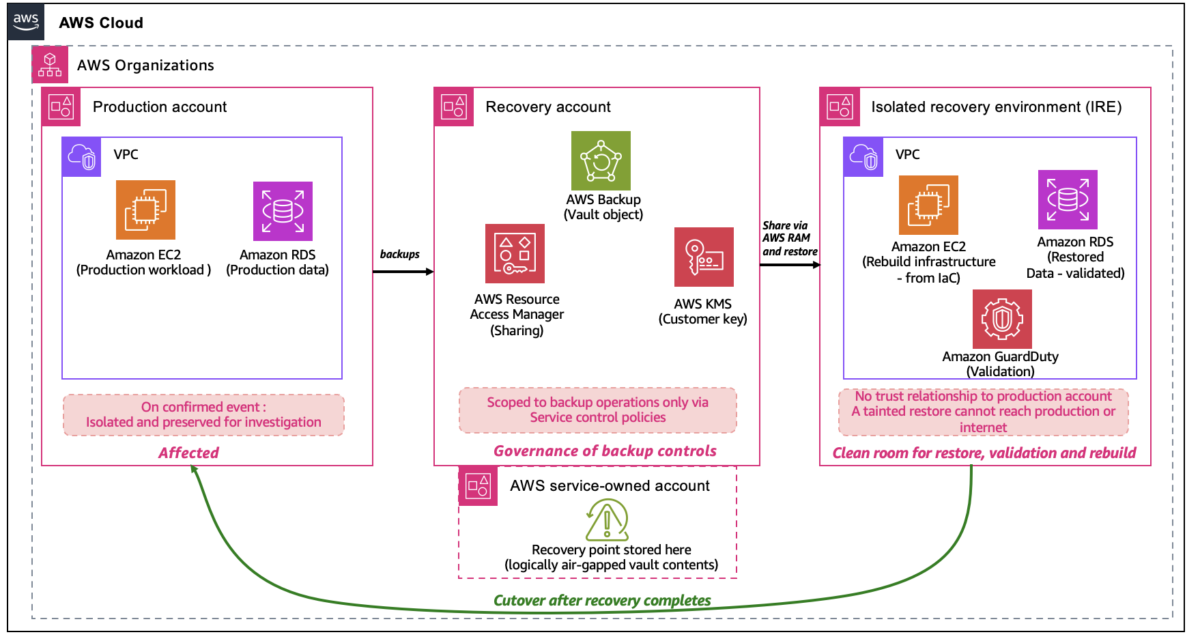
The core architectural idea in cyber resilience is that the recovery environment, including its identities, keys, and network paths, shouldn’t share a trust boundary with the environment being recovered. If production identity is compromised, recovery must be able to proceed without depending on it.Most customers achieve this using separate AWS accounts inside an AWS Organization. A common pattern uses three account roles:
Production Accounts
The production account is where workloads run. If a cyber event is confirmed, these accounts are isolated for investigation. Recovery work doesn’t happen in production, because in some scenarios remediation in place may not fully restore trust.
Recovery Account
The recovery account owns the AWS Backup logically air-gapped vault. Most AWS-native backup mechanisms produce recovery points that are inherently immutable. You can’t modify an Amazon Elastic Block Store (Amazon EBS) snapshot or an Amazon Relational Database Service (Amazon RDS) snapshot after creation. The logically air-gapped vault adds deletion protection. Recovery points can’t be deleted or have their retention period shortened by any principal, including the account root user or a compromised administrator, within the retention period. This account’s purpose is to keep the controls around backups safe. It’s where you configure who can share the vault, who can initiate a restore, and who approves a restore operation through Multi-party approval (MPA). Keeping these controls in a dedicated account, restricted to backup operations by Service Control Policies, means a compromised identity in a production account cannot modify them.
Isolated Recovery Environment (IRE)
Where backups are restored, validated, and the new production environment is rebuilt before cutover. The IRE is kept separate from the Production Account so that if a restored backup still contains the threat, it has nowhere to spread. It has no trust relationship to the Production Account, no VPC peering to it, and no internet-facing resources, so a tainted restore discovered during validation stays contained inside the IRE instead of reaching back into production or out to the internet. Infrastructure deployment in the IRE uses VPC endpoints (AWS PrivateLink) to reach AWS service APIs without internet connectivity or VPC peering to production. The following diagram shows how the three account roles relate to each other within a single AWS Organization, including their trust boundaries and the flow of recovery points between them.
Figure 1. The Production Account is isolated after a confirmed event. The Recovery Account owns the logically air-gapped vault and controls restore authorization through Multi-party approval. The IRE has no trust relationship or network path to production.
Best practices for the AWS Backup logically air-gapped vault
The AWS Backup logically air-gapped vault is the primary AWS-native option for protecting backup storage from deletion.
Use the vault for what it provides, which is deletion protection enforced by the service. A logically air-gapped vault is always locked in Compliance mode. The service itself enforces retention, so recovery points can’t be deleted by any principal, including the account root user or a compromised administrator, within the retention period. Deletion protection keeps the recovery point available when needed. Whether the recovery point is safe to use is determined by the validation pipeline described in the following section.
Understand where recovery points live. A logically air-gapped vault stores recovery points in AWS service-owned accounts. You can choose to encrypt these recovery points with either a service-owned key or an AWS Key Management Service (AWS KMS) customer managed key. The vault object in your Recovery Account is the governance and access boundary where sharing, restore authorization, and Multi-party approval are configured. This separation is what makes the air-gap logical rather than network-based.
Share recovery points through AWS Resource Access Management (AWS RAM) for restore. You share recovery points across accounts through AWS RAM. You can initiate restores from the owning account or from any account with which you share the vault. This is how the Recovery Account makes recovery points available to the IRE.
Configure Multi-party approval for restore. MPA, configured through IAM Identity Center, requires a predefined set of approvers before a restore proceeds. This is particularly valuable when the source account might no longer be trusted.
Back up fully managed resources directly to the vault. AWS Backup supports the logically air-gapped vault as a primary backup target for fully managed resources (Amazon Simple Storage Service (Amazon S3), Amazon DynamoDB, Amazon Elastic File System (Amazon EFS)), so backups can be written directly to the vault without staging in a standard vault first. Non-fully-managed resources (Amazon EBS, Amazon Aurora, Amazon FSx) use an intelligent orchestration path where the service creates and transfers a temporary snapshot.
For S3 data outside the vault’s supported resource set, Amazon S3 Object Lock in Compliance mode paired with S3 Versioning provides equivalent deletion protection at the S3 layer.
Validation pipeline
A successful restore confirms that the backup was readable. Validation confirms that it’s safe to use. No single check catches everything, which is why validation combines several layers.For ransomware, a malware scan on the restored volume catches known encryption tools and indicators. For threats that have been present in the environment for some time, a malware scan isn’t enough because the attacker might have modified legitimate code, configuration, or data in ways that look normal to a scanner. These kinds of changes show up through workload-specific checks, such as a database consistency check failing, an application invariant being violated, or a configuration diff showing an unexpected change against a known-good baseline. Log and audit review across the backup window helps identify unexpected identity or configuration changes that neither a malware scan nor a workload check would catch on their own.The layers commonly combined into a validation pipeline:
| Layer | Capability | What it provides |
| AWS native | AWS Backup Restore Testing | Automated verification that backups are recoverable, with custom hooks via the PutRestoreValidationResult API |
| AWS native | Amazon GuardDuty Malware Protection | Malware scanning on restored volumes |
| AWS Partner | AWS Marketplace partner solutions | Content-level ransomware scanning inside backup contents, without requiring a full restore first |
| Workload-specific | Integrity and consistency checks | Database consistency, application invariants, configuration diffs against known-good baselines |
| Cross-cutting | Log and audit review | Identify unexpected identity or configuration changes across the backup window using AWS CloudTrail and workload logs |
Both AWS-native validation and workload-specific validation should pass before a recovery point is approved. Validation happens in the IRE so that if any check detects a problem, the affected restore is contained inside the IRE and doesn’t reach production.AWS backup mechanisms operate independently per service, so recovery points for different services might not be precisely time-synchronized. Aligning backup schedules as tightly as possible and including cross-service consistency checks in the validation pipeline reduces this gap.
Selecting a safe recovery point
For most operational recoveries, the most recent backup is the right one. For cyber events and for data corruption more generally, the most recent working copy is often a better target. If an adversary was present in the environment before detection, backups taken during that window might carry the same issues.
The following diagram illustrates how recovery point candidates are evaluated against the compromise boundary to identify the most recent backup that’s safe to use.
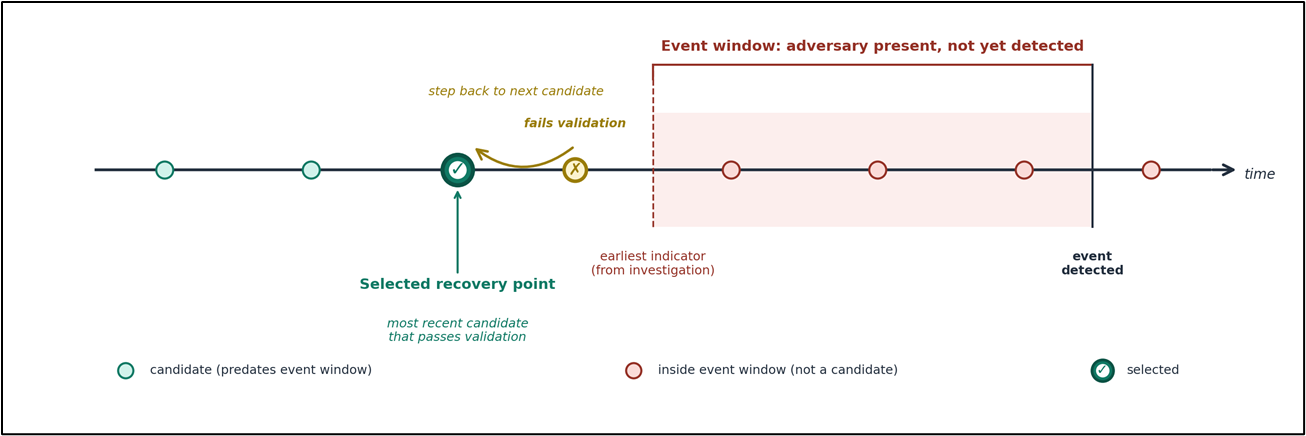
Figure 2. Candidates are evaluated in reverse chronological order starting from the most recent backup that predates the event boundary, with each passing through the validation pipeline before approval.
- Building an investigation timeline from AWS CloudTrail, Amazon Virtual Private Cloud (Amazon VPC) Flow Logs, Amazon GuardDuty, AWS Security Hub, and workload logs, to identify the earliest plausible indicator of the event.
- Evaluating recovery point candidates in reverse chronological order, starting from the most recent backup that predates the event window.
- Running the validation pipeline against each candidate. If validation fails, stepping back to the next candidate.
- Approving the chosen recovery point with documentation of the approver and rationale.
Backup retention should include recovery points that predate realistic detection windows in your organization. Detection timing varies widely by organization and by threat type, so this is a number to set based on your own investigation capabilities and to revisit as those mature.
Recovery workflow
Recovery has five stages. Three of them run at the same time because the slowest path through recovery is what determines how long the business is down. Investigation and validation run in parallel with infrastructure rebuild so the new environment is being built while the recovery point is being chosen. We wait to restore data because restoring untrusted data into a new environment defeats the purpose of the validation. The following diagram shows which stages run in parallel and where the approval gate separates validation from data restore.
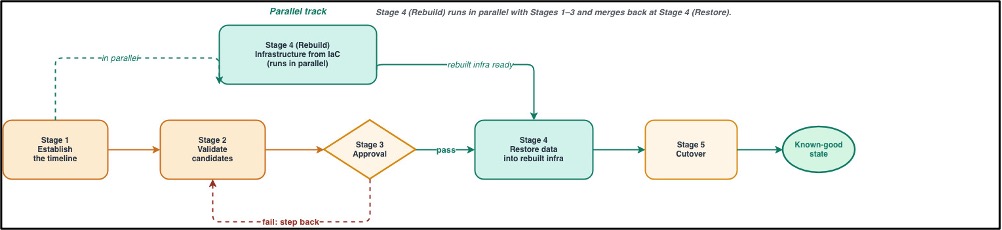
Figure 3. Stages 1, 2, and 4 (investigation, validation, and infrastructure rebuild) run in parallel. Stage 3 (approval) is the gate before validated data is restored into the rebuilt environment.
- Stage 1: Establish the timeline. Query AWS CloudTrail, Amazon VPC Flow Logs, Amazon GuardDuty findings, AWS Security Hub, and workload logs to identify the earliest indicator of the event. That timestamp becomes the event boundary, and only recovery points created before it are candidates for restore. AWS Security Incident Response (SIR) can provide coordinated triage and response support for this stage.
- Stage 2: Validate candidates. Run the validation pipeline against recovery points that predate the event window, in reverse chronological order. If the most recent candidate fails validation, step back to the next one. This stage runs in parallel with Stage 1, because the investigation and the validation checks don’t depend on each other.
- Stage 3: Approval. Approve only recovery points that pass all validation checks. If the vault is configured with Multi-party approval, the predefined approvers authorize the restore, and the approval action is automatically recorded as an AWS CloudTrail management event. Document the rationale for recovery point selection: investigation findings, validation results, and the basis for the decision, in your incident management process. If validation fails on the chosen candidate, return to Stage 2 with an earlier one.
- Stage 4: Rebuild and restore. Rebuild infrastructure in the IRE from infrastructure as code (IaC) templates stored in a separate, version-controlled repository. Rebuild runs in parallel with Stages 1 and 2. After Stage 3 approves a recovery point, restore the validated data from the logically air-gapped vault into the rebuilt infrastructure. Apply credential rotation during this stage following the Rebuild-Restore-Rotate framework.
- Stage 5: Cutover. Move production traffic from the affected environment to the rebuilt one. Use DNS records with health checks so traffic only shifts when the new environment is ready to serve it. Before cutover, identify and update cross-account references that point to the original Production Account, IAM role trust policies, resource-based policies, AWS KMS key grants, and service integrations. IAM Access Analyzer and AWS Config can help identify these dependencies. Monitor the transition and keep the affected Production Account isolated until the investigation is complete.
The Rebuild-Restore-Rotate framework
Cyber recovery requires sorting what gets rebuilt from code, restored from backup, and generated fresh:
Infrastructure is code. Data is backup. Credentials are new.
| Category | Examples | Why |
| Rebuild from code | IAM policies and roles, Security Groups, Amazon EC2, Amazon VPC, AWS Lambda, CI/CD pipeline definitions | Configurations come from reviewed, version-controlled templates rather than from a backup that may have been affected |
| Restore from backup | Amazon RDS, Amazon Aurora, Amazon EFS, Amazon EBS, Amazon FSx | Business data cannot be recreated from code and must come from validated, immutable backups |
| Rotate or re-issue | IAM access keys, database passwords, API keys, certificates, OAuth tokens, SSH keys | Any secret that may have been exposed during the event window is replaced, not carried forward from backup |
Some services sit across two categories. For example, Amazon S3 buckets and Amazon DynamoDB tables have both configuration (rebuilt from code) and data inside them (restored from backup), so recovery treats the two layers separately. Similarly, some credentials are re-issued by AWS rather than rotated by you. For example, consider service-linked roles and STS session tokens. The framework still applies, it’s just AWS that issues them fresh. Other data stores aren’t backed up at all because they are derived from sources that are backed up. Search indexes, analytics tables, caches, and materialized views are common examples. These regenerate from restored data, so they are a recovery dependency rather than a separate recovery category but they must be included in the recovery runbook and sequenced after the data they depend on has been restored. The framework assumes that your source of configuration, including IaC templates, pipelines, and source repositories, wasn’t itself the target of the attack. If it was, recovery starts further upstream with a trusted copy of source before rebuild can begin. Knowing where your known-good source of configuration lives, and how it is protected, is worth thinking through in advance.
For credential rotation, the practical prerequisite is a rotation process that already exists and is exercised. AWS Secrets Manager rotation, IAM Identity Center session revocation, AWS Certificate Manager renewal, and workload-specific rotation hooks are components most customers already have in some form. The cyber recovery capability is the ability to invoke that rotation comprehensively and verify that nothing was missed.
For services not currently supported by the logically air-gapped vault, Cross-Region Replication to a locked bucket or service-native point-in-time recovery can serve as interim options. These are recovery-oriented copies rather than tamper-proof storage and should be treated accordingly when designing around them.
Next steps
The following steps provide a starting point for teams building cyber recovery capability. Each step can be implemented incrementally, but together they form the operational foundation for the recovery workflow described in this post.
- Create a logically air-gapped vault in a dedicated Recovery Account, and configure Multi-party approval for restore operations.
- Establish an Isolated Recovery Environment in advance, with no trust relationship to production and no network path into the production environment. Pre-configure the networking, monitoring, and access controls required for recovery operations. Use SCPs to enforce isolation.
- Enable AWS Backup Restore Testing on a regular schedule, and enable Amazon GuardDuty Malware Protection for backup and volume scanning.
- Define workload-specific integrity checks for business-critical data (database consistency, application invariants, configuration diffs).
- Confirm the credential rotation process works end-to-end and can be invoked as part of recovery, not only on a routine schedule. AWS Secrets Manager rotation provides the automation framework for database passwords and API keys.
- Map cross-account dependencies (IAM role trust policies, resource-based policies, AWS KMS key grants, and service integrations) and maintain the inventory in your recovery runbook.
- Exercise the full workflow, including investigation, validation, rebuild, restore, and cutover, on a regular schedule.
Conclusion
Cyber resilience on AWS builds on the services and patterns customers already use for recovery, with additions that address the specific concern that the production environment, the backups, or the recovery path itself may not be trustworthy after an event. The reference approach in this post, including isolation of recovery from production, deletion protected backup storage, a validation pipeline, a concrete workflow, and the Rebuild-Restore-Rotate framework, is a starting point. How you adapt it depends on your workloads, your existing recovery posture, and your organizational boundaries.
About the authors
Author: Ashish Panwar