

Drive organizational growth with Amazon Lex multi-developer CI/CD pipeline
Scaling Amazon Lex development requires isolated environments, version control, and automated deployment pipelines… In this post, we walk through a multi-developer CI/CD pipeline for Amazon Lex that enables isolated development environments, automated testing, and streamlined deployments… Deve…
As your conversational AI initiatives evolve, developing Amazon Lex assistants becomes increasingly complex. Multiple developers working on the same shared Lex instance leads to configuration conflicts, overwritten changes, and slower iteration cycles. Scaling Amazon Lex development requires isolated environments, version control, and automated deployment pipelines. By adopting well-structured continuous integration and continuous delivery (CI/CD) practices, organizations can reduce development bottlenecks, accelerate innovation, and deliver smoother intelligent conversational experiences powered by Amazon Lex.
In this post, we walk through a multi-developer CI/CD pipeline for Amazon Lex that enables isolated development environments, automated testing, and streamlined deployments. We show you how to set up the solution and share real-world results from teams using this approach.
Transforming development through scalable CI/CD practices
Traditional approaches to Amazon Lex development often rely on single-instance setups and manual workflows. While these methods work for small, single-developer projects, they can introduce friction when multiple developers need to work in parallel, leading to slower iteration cycles and higher operational overhead. A modern multi-developer CI/CD pipeline changes this dynamic by enabling automated validation, streamlined deployment, and intelligent version control. The pipeline minimizes configuration conflicts, improves resource utilization, and empowers teams to deliver new features faster and more reliably. With continuous integration and delivery, Amazon Lex developers can focus less on managing processes and more on creating engaging, high-quality conversational AI experiences for customers. Let’s explore how this solution works.
Solution architecture
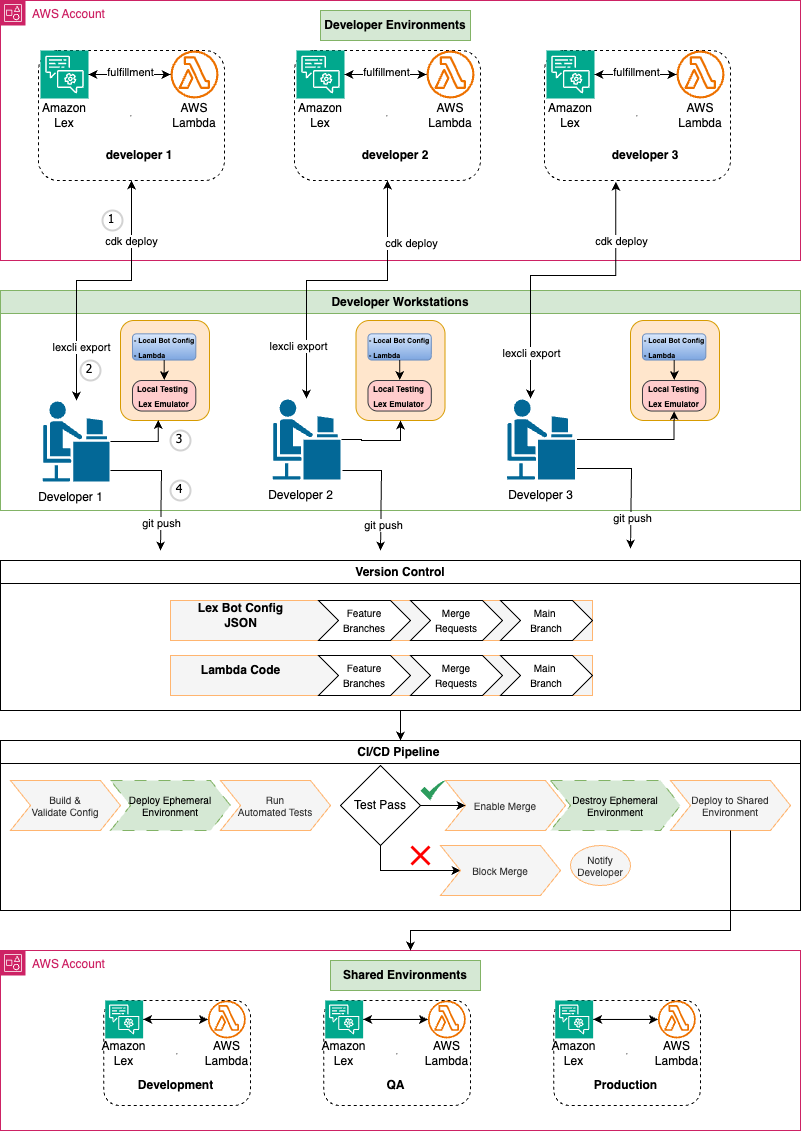
The multi-developer CI/CD pipeline transforms Amazon Lex from a limited, single-user development tool into an enterprise-grade conversational AI platform. This approach addresses the fundamental collaboration challenges that slow down conversational AI development. The following diagram illustrates the multi-developer CI/CD pipeline architecture:
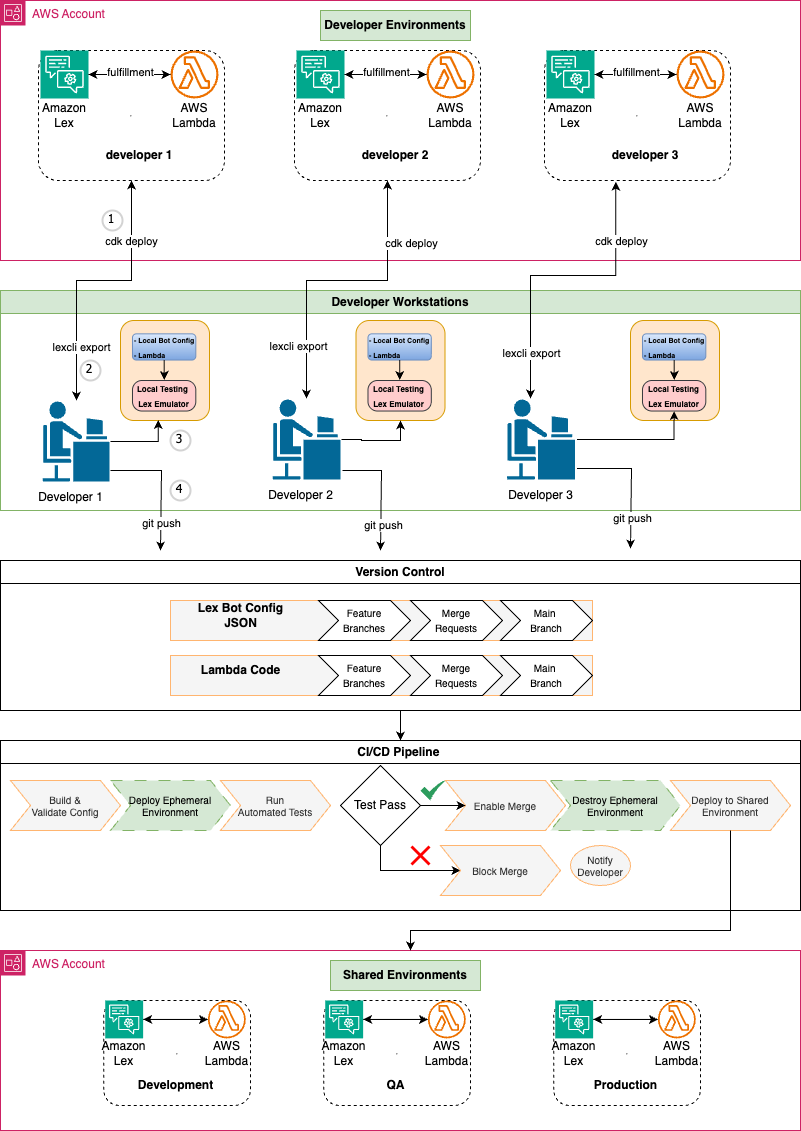
Using infrastructure as code (IaC) with AWS Cloud Development Kit (AWS CDK), each developer runs cdk deploy to provision their own dedicated Lex assistant and AWS Lambda instances in a shared Amazon Web Services (AWS) account. This approach eliminates the overwriting issues common in traditional Amazon Lex development and enables true parallel work streams with full version control capabilities.
Developers use lexcli, a custom AWS Command Line Interface (AWS CLI) tool, to export Lex assistant configurations from the shared AWS account to their local workstations for editing. Developers then test and debug locally using lex_emulator, a custom tool providing integrated testing for both assistant configurations and AWS Lambda functions with real-time validation to catch issues before they reach cloud environments. This local capability transforms the development experience by providing immediate feedback and reducing the need for time-consuming cloud deployments during iterations.
When developers push changes to version control, this pipeline automatically deploys ephemeral test environments for each merge request through GitLab CI/CD. The pipeline runs in Docker containers, providing a consistent build environment that ensures reliable Lambda function packaging and reproducible deployments. Automated tests run against these temporary stacks, and merges are only enabled if all tests are successful. Ephemeral environments are automatically destroyed after merge, ensuring cost efficiency while maintaining quality gates. Failed tests block merges and notify developers, preventing broken code from reaching shared environments.
Changes that pass testing in ephemeral environments are promoted to shared environments (Development, QA, and Production) with manual approval gates between stages. This structured approach maintains high-quality standards while accelerating the delivery process, enabling teams to deploy new features and improvements with confidence.
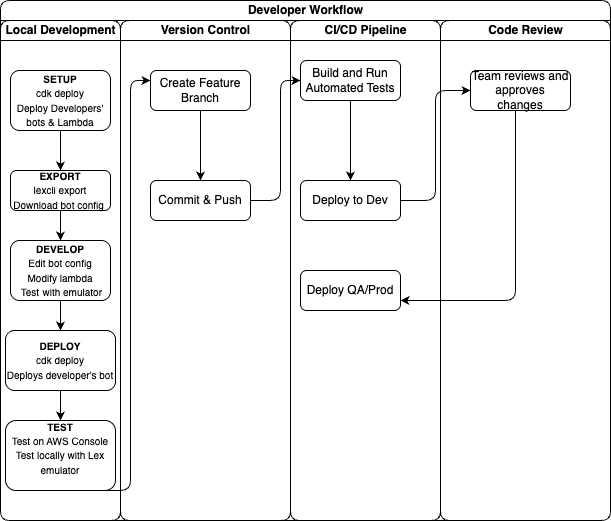
The following graphic illustrates the developer workflow organized by phases: local development, version control, and automated deployment. Developers work in isolated environments before changes flow through the CI/CD pipeline to shared environments.
Business Impact
By enabling parallel development workflows, this solution delivers substantial time and efficiency improvements for conversational AI teams. Internal evaluations show teams can parallelize much of their development work, driving measurable productivity gains. Results vary based on team size, project scope, and implementation approach, but some teams have reduced development cycles significantly. The acceleration has enabled teams to deliver features in weeks rather than months, improving time-to-market. The time savings allow teams to handle larger workloads within existing development cycles, freeing capacity for innovation and quality improvement.
Real-world success stories
This multi-developer CI/CD pipeline for Amazon Lex has supported enterprise teams in improving their development efficiency. One organization used it to migrate their platform to Amazon Lex, enabling multiple developers to collaborate concurrently without conflicts. Isolated environments and automated merge capabilities helped maintain consistent progress during complex development efforts.
A large enterprise adopted the pipeline as part of its broader AI strategy. By using validation and collaboration features within the CI/CD process, their teams enhanced coordination and accountability across environments. These examples illustrate how structured workflows can contribute to improved efficiency, smoother migrations, and reduced rework.
Overall, these experiences demonstrate how the multi-developer CI/CD pipeline helps organizations of varying scales strengthen their conversational AI initiatives while maintaining consistent quality and development velocity.
See the solution in action
To better understand how the multi-developer CI/CD pipeline works in practice, watch this demonstration video that walks through the key workflows. It shows how developers work in parallel on the same Amazon Lex assistant, resolve conflicts automatically, and deploy changes through the pipeline.
Getting started with the solution
The multi-developer CI/CD pipeline for Amazon Lex is available as an open source solution through our GitHub repository. Standard AWS service charges apply for the resources you deploy.
Prerequisites and environment setup
To follow along with this walkthrough, you need:
- NodeJS 22.9.0 or later
- AWS Cloud Development Kit 2.176.0 or later (AWS CDK)
- Python 3.12.8 or later
- Docker (required for AWS CDK to bundle Python Lambda functions)
- An AWS account with permissions to create Amazon Lex assistants, Lambda functions, and AWS Identity and Access Management (IAM) roles
Core components and architecture
The framework consists of several key components that work together to enable collaborative development: infrastructure-as-code with AWS CDK, the Amazon Lex CLI tool called lexcli, and the GitLab CI/CD pipeline configuration.
The solution uses AWS CDK to define infrastructure components as code, including:
- Individual Amazon Lex instances for each developer
- Lambda functions for fulfillment logic
- Amazon CloudWatch logging and monitoring
- Amazon Simple Storage Service (Amazon S3) buckets for configuration storage
Deploy each developer’s environment using:
This creates a complete, isolated environment that mirrors the shared configuration but allows for independent modifications.
The lexcli tool exports Amazon Lex assistant configuration from the console into version-controlled JSON files. When invoking lexcli export <environment>, it will:
- Connect to your deployed assistant using the Amazon Lex API
- Download the complete assistant configuration as a .zip file
- Extract and standardize identifiers to make configurations environment-agnostic
- Format JSON files for review during merge requests
- Provide interactive prompts to selectively export only changed intents and slots
This tool transforms the manual, error-prone process of copying assistant configurations into an automated, reliable workflow that maintains configuration integrity across environments.
The .gitlab-ci.yml file orchestrates the entire development workflow:
- Ephemeral environment creation – Automatically creates and destroys a temporary dynamic environment for each merge request.
- Automated testing – Runs comprehensive tests including intent validation, slot verification, and performance benchmarks
- Quality gates – Enforces code linting and automated testing with 40% minimum coverage; requires manual approval for all environment deployments
- Environment promotion – Enables controlled deployment progression through dev, staging, production with manual approval at each stage
The pipeline ensures only validated, tested changes progress through deployment stages, maintaining quality while enabling rapid iteration.
Step-by-step implementation guide
To create a multi-developer CI/CD pipeline for Amazon Lex, complete the steps in the following sections. Implementation follows five phases:
- Repository and GitLab setup
- AWS authentication setup
- Local development environment
- Development workflow
- CI/CD pipeline execution
Repository and GitLab setup
To set up your repository and configure GitLab variables, follow these steps:
- Clone the sample repository and create your own project:
- To configure GitLab CI/CD variables, navigate to your GitLab project and choose Settings. Then choose CI/CD and Variables. Add the following variables:
- For
AWS_REGION, enterus-east-1 - For
AWS_DEFAULT_REGION, enterus-east-1 - Add the other environment-specific secrets your application requires
- For
- Set up branch protection rules to protect your main branch. Proper workflow enforcement prevents direct commits to the production code.
AWS authentication setup
The pipeline requires appropriate permissions to deploy AWS CDK changes within your environment. This can be achieved through various methods, such as assuming a specific IAM role within the pipeline, using a hosted runner with an attached IAM role, or enabling another approved form of access. The exact setup depends on your organization’s security and access management practices. The detailed configuration of these permissions is outside the scope of this post, but it’s essential to properly authorize your runners and roles to perform CDK deployments.
Local development environment
To set up your local development environment, complete the following steps:
- Install dependencies
- Deploy your personal assistant environment:
This creates your isolated assistant instance for independent modifications.
Development workflow
To create the development workflow, complete the following steps:
- Create a feature branch:
- To make assistant modifications, follow these steps:
- Access your personal assistant in the Amazon Lex console
- Modify intents, slots, or assistant configurations as needed
- Test your changes directly in the console
- Export changes to code:
The tool will interactively prompt you to select which changes to export so you only commit the modifications you intended.
- Review and commit changes:
CI/CD pipeline execution
To execute the CI/CD pipeline, complete the following steps:
- Create merge request – The pipeline automatically creates an ephemeral environment for your branch
- Automated testing – The pipeline runs comprehensive tests against your changes
- Code review – Team members can review both the code changes and test results
- Merge to main – After the changes are approved, they’re merged and automatically deployed to development
- Environment promotion – Manual approval gates control promotion to QA and production
What’s next?
After implementing this multi-developer pipeline, consider these next steps:
- Scale your testing – Add more comprehensive test suites for intent validation
- Enhance monitoring – Integrate Amazon CloudWatch dashboards for assistant performance
- Explore hybrid AI – Combine Amazon Lex with Amazon Bedrock for generative AI capabilities
For more information about Amazon Lex, refer to the Amazon Lex Developer Guide.
Conclusion
In this post, we showed how implementing multi-developer CI/CD pipelines for Amazon Lex addresses critical operational challenges in conversational AI development. By enabling isolated development environments, local testing capabilities, and automated validation workflows, teams can work in parallel without sacrificing quality, helping to accelerate time-to-market for complex conversational AI solutions.
You can start implementing this approach today using the AWS CDK prototype and Amazon Lex CLI tool available in our GitHub repository. For organizations looking to enhance their conversational AI capabilities further, consider exploring the Amazon Lex integration with Amazon Bedrock for hybrid solutions using both structured dialog management and large language models (LLMs).
We’d love to hear about your experience implementing this solution. Share your feedback in the comments or reach out to AWS Professional Services for implementation guidance.
About the authors
Author: Grazia Russo Lassner