

Dual-token authentication for Nakama game servers with Amazon Cognito on AWS
Dual-token authentication for Nakama game servers with Amazon Cognito solves this by connecting two independent session systems, each with its own token lifecycle, without interrupting the player… Amazon Cognito handles player identity and Nakama manages game sessions… Cognito issues a JWT, a …
When your game server needs both a managed identity provider and its own session system, players face a broken experience if authentication forces a redirect or stalls gameplay. Dual-token authentication for Nakama game servers with Amazon Cognito solves this by connecting two independent session systems, each with its own token lifecycle, without interrupting the player. This post shows you how.
Amazon Cognito handles player identity and Nakama manages game sessions. Cognito issues a JWT, a server-side Go hook validates it and exchanges the verified identity for a Nakama session token. Each token is validated independently on every request. The pattern applies to game servers such as Nakama that support runtime authentication hooks.
The infrastructure wraps Nakama in a default-closed routing layer. Amazon CloudFront serves as the single HTTPS entry point, AWS WAF filters traffic at the edge, an Application Load Balancer (ALB) enforces an explicit route allow-list for HTTP, and a Network Load Balancer (NLB) handles WebSocket TCP passthrough. Nakama runs on Amazon Elastic Container Service (Amazon ECS) on AWS Fargate. In this post, we cover the Cognito configuration, the Go hook, the Terraform infrastructure, and the WebSocket lifecycle controls.
In this post, you learn how to:
- Configure an Amazon Cognito User Pool for SRP-based game client authentication with no client secret.
- Implement a Go runtime hook that validates Cognito JWTs and bridges player identity to Nakama sessions.
- Set up a default-closed routing layer using Amazon CloudFront, an ALB, and an NLB.
- Manage the WebSocket connection lifecycle under the NLB TCP idle timeout model.
Solution overview
The architecture has four layers for authenticating and routing traffic.
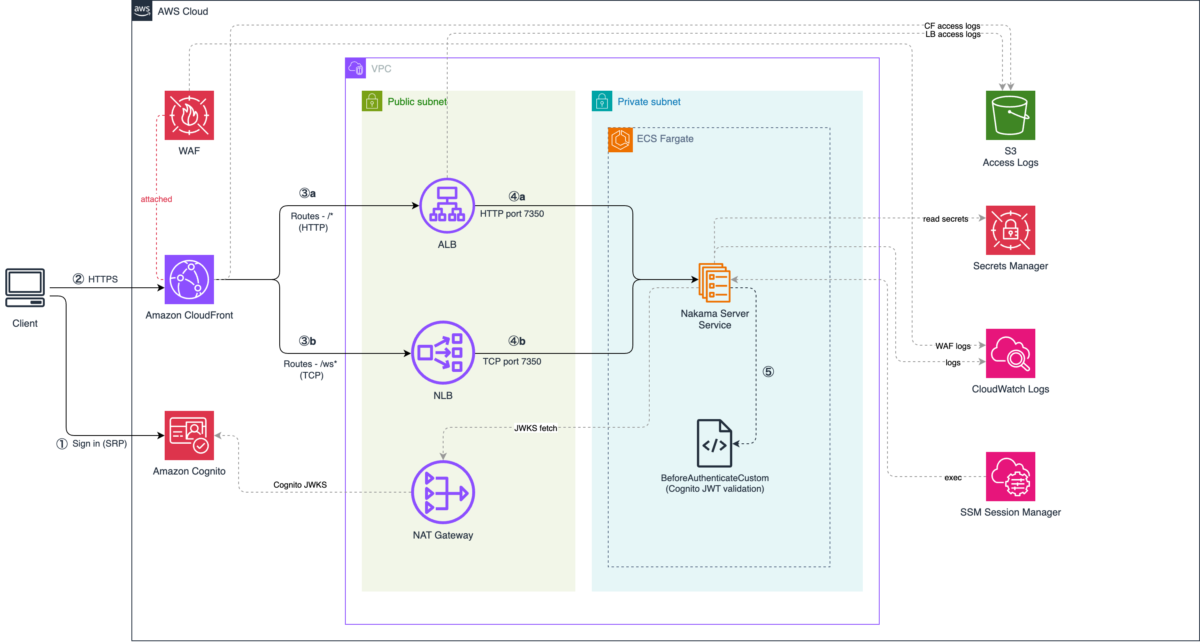
The following diagram shows the architecture. Amazon CloudFront is the single entry point, routing HTTP API traffic through an Application Load Balancer (ALB) to Nakama on Amazon ECS, and WebSocket traffic through a Network Load Balancer (NLB) via TCP passthrough.
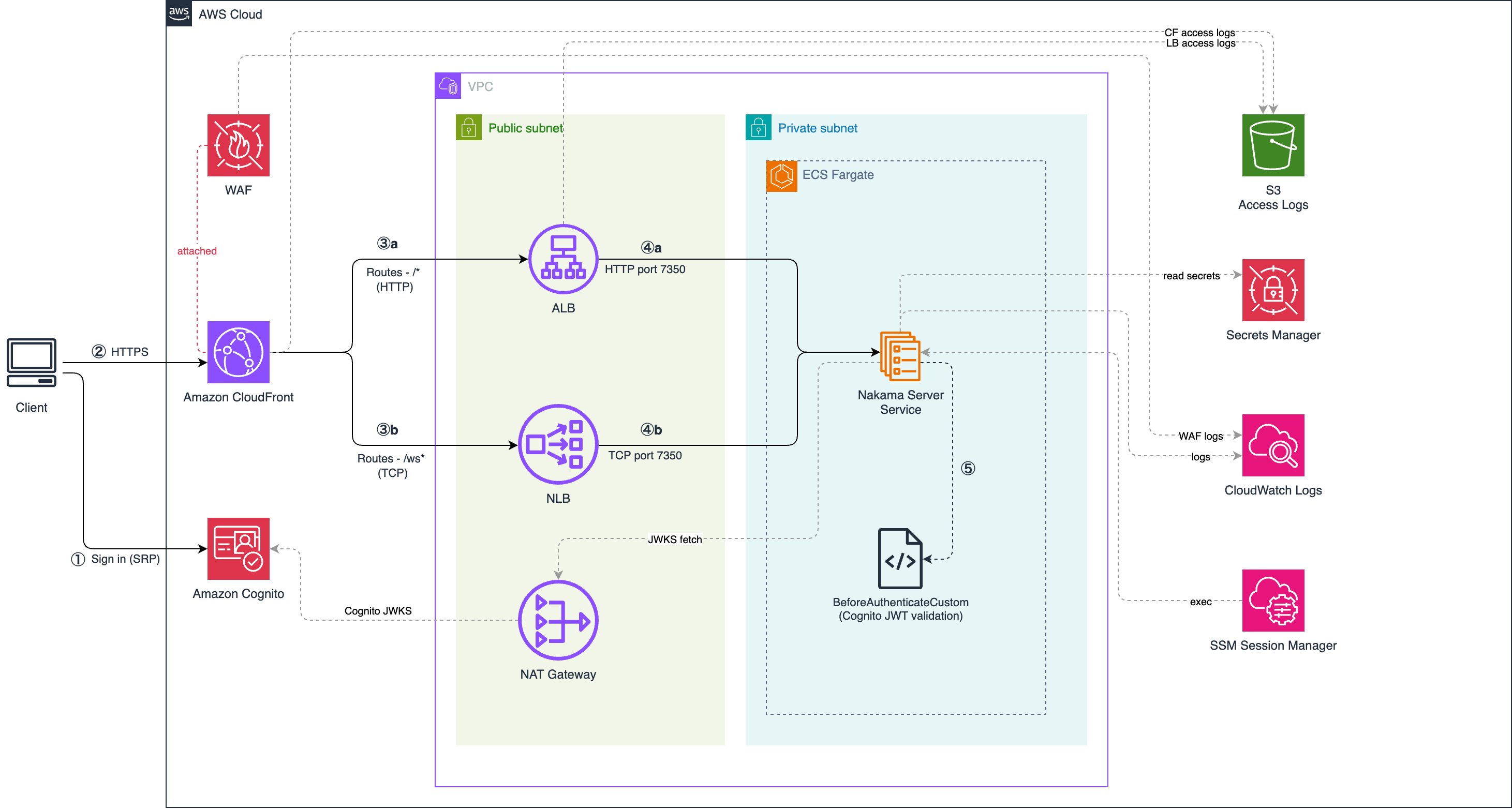
Figure 1. Dual-token authentication architecture for Nakama on AWS.
Traffic flows through the system in six steps:
- Client → Amazon Cognito — The player authenticates using USER_SRP_AUTH. The password never leaves the client. Amazon Cognito returns a JWT access token.
- Client → Amazon CloudFront — Requests enter via Amazon CloudFront (HTTPS). AWS WAF inspects traffic at the edge before it reaches the origin.
- CloudFront → ALB (port 80) — /* HTTP API traffic. The ALB is security-group locked to the CloudFront managed prefix list only.
- CloudFront → NLB (port 7350) — /ws* WebSocket traffic. The NLB performs TCP passthrough with no HTTP inspection.
- ALB → Amazon ECS (Nakama) — For auth requests: the BeforeAuthenticateCustom Go hook validates the Cognito JWT and extracts the
subclaim as the Nakama user ID. For other API calls: Nakama validates its own session token. - NLB → Amazon ECS (Nakama) — Persistent WebSocket connection. Nakama validates the session token from the token query parameter at connect time.
Why two load balancers
The ALB and NLB serve different purposes and cannot be combined into one.
The ALB operates at the HTTP layer (Layer 7). It reads the path, applies listener rules, and returns 403 for unlisted routes.
The NLB operates at the TCP layer (Layer 4) and passes the raw stream to Nakama unchanged. Nakama receives the WebSocket upgrade directly from the client, validates the session token, and manages the connection lifecycle end-to-end.
Amazon CloudFront routes /ws* to the NLB and everything else to the ALB, so each connection type gets the appropriate handling behind a single HTTPS endpoint.
Prerequisites
Before you deploy this solution, make sure you have:
- Terraform >= 1.5.0 (download).
- Go >= 1.21 (to build the Nakama plugin locally).
- Docker and the AWS Command Line Interface (AWS CLI) configured with appropriate credentials.
The repository includes a browser-based test app (/app) that demonstrates the full sign-up, sign-in, and Nakama token exchange flow.
Authenticate players with Amazon Cognito
Amazon Cognito provides a managed user directory that issues JWTs without requiring you to run your own identity server or store credentials. The game server validates the JWT independently on each request, with no callback to Cognito needed. This decouples identity from game sessions: Cognito owns the player’s identity, Nakama owns the game session, and neither system depends on the other at runtime.
Players self-register by calling the Cognito SignUp API from the game client. The User Pool verifies their email before the account becomes active. After sign-in, Cognito returns a JWT access token containing the player’s sub claim (a UUID), which becomes the Nakama user ID in the next step.
Authentication uses the USER_SRP_AUTH flow. The password never leaves the client device. The User Pool App Client is configured as a public client with no client secret, since your game client runs in the browser or a native app where any embedded secret is extractable. With SRP, no secret is needed; security comes from the protocol itself.
After a successful sign-in, Amazon Cognito returns a JWT access token. This token carries the player’s identity claims and is signed with an RSA key pair unique to your User Pool. The sub claim — a UUID generated by Cognito — uniquely identifies the player and becomes the Nakama user ID in the next step.
The auth Terraform module configures the App Client with generate_secret=false and permits only ALLOW_USER_SRP_AUTH and ALLOW_REFRESH_TOKEN_AUTH flows. The resulting JWT access token is short-lived (1 hour by default) and carries the sub, iss, exp, and client_id claims that the Go hook validates in the next step.
Bridge Cognito identity to Nakama sessions
Nakama’s server-side runtime supports Go plugins exclusively. The hook in this section is written in Go using Nakama’s runtime.Initializer interface. This is a constraint of the Nakama runtime model.
Once the client has a Cognito JWT, it needs a Nakama session token to make game API calls.
Validate the Cognito JWT in the Go hook
The game server cannot trust the identity claim sent by the client directly. Any client can forge a user ID. JWT validation cryptographically proves the identity was issued by Cognito, preventing player impersonation.
The hook performs five checks in order: token format, algorithm (RS256 only), signature against the JWKS, expiry, and issuer/audience matching your specific User Pool.
Security note: The hook never trusts the identity string sent by the client. It discards it and overwrites the Nakama user ID with the sub claim from the validated JWT. A client that sends a forged sub cannot impersonate another player — the hook ignores the body value entirely.
Cache JWKS keys with thundering herd protection
Amazon Cognito rotates its signing keys periodically. The hook caches keys with a 1-hour TTL. A 30-second re-fetch guard prevents multiple goroutines from calling the JWKS endpoint simultaneously when the cache expires.
Register the hook
The hook registers itself in InitModule, the entry point called by Nakama when the plugin loads:
When the client calls POST /v2/account/authenticate/custom with the Cognito JWT as the id field, Nakama calls beforeAuthenticateCustom before processing the request. If the JWT is valid, the hook sets in.Account.Id = sub and returns. Nakama creates or links the account and returns a session token to the client.
If your server is not Nakama, for example, Colyseus, Photon, or a custom WebSocket server, implement the same five checks (algorithm, signature, expiry, issuer, audience) in your server’s middleware or plugin language. The JWKS endpoint and JWT structure follow the OIDC standard, so any OIDC-compliant identity provider (not only Amazon Cognito) works with this pattern.
Deploy the infrastructure
The infrastructure is organized into six Terraform modules: network (Amazon Virtual Private Cloud (Amazon VPC), subnets, security groups), compute (Amazon ECS cluster, ALB, NLB, Amazon Elastic Container Registry (Amazon ECR)), auth (Cognito User Pool), cdn (CloudFront distribution), waf-cloudfront (AWS WAF Web ACL), and ops (IAM, AWS Systems Manager access). A bootstrap module creates the S3 state backend and AWS Key Management Service (AWS KMS) key before the main deployment.
Deploy with:
make deploy builds and pushes the Nakama container image to Amazon ECR, then runs terraform apply. The image tag auto-increments from the latest tag in ECR.
ALB routing: explicit allow list
The ALB default listener action returns 403. Only the paths in the following table reach Nakama. Requests to unlisted paths are rejected before they reach the game server.
| Priority | Path | Target | Purpose |
| 1 | /healthcheck | Nakama port 7350 | Health monitoring |
| 2 | /v2/account/authenticate/* | Nakama port 7350 | Session bridge: Go hook validates JWT |
| 10 | /v2/* | Nakama port 7350 | Nakama REST API v2 |
| 11 | /v1/* | Nakama port 7350 | Nakama RPC (v1) |
| Default | * | 403 Forbidden | Request never reaches Nakama |
The default-403 posture means a misconfigured client or a scanner probing arbitrary paths gets a 403 at the ALB, not an error from the game server. This limits the attack surface to the explicitly listed API surface.
Security group chain
The network layer enforces two security group rules:
- The ALB security group allows inbound only from the CloudFront managed prefix list. As an additional application-layer check, CloudFront sends a shared secret in the
X-CloudFront-Secretheader on every request; ALB listener rules reject any request missing the correct value with a403. The NLB security group applies the same CloudFront managed prefix list restriction at Layer 4. - The NLB security group allows inbound TCP 7350 only from the CloudFront managed prefix list. The ECS task security group allows inbound port 7350 only from the ALB security group (HTTP API) and from the NLB security group (WebSocket).
Together, the routing and security group chain means the only path to Nakama is: Internet → CloudFront → AWS WAF → ALB or NLB → ECS. No hop can be skipped.
Manage the WebSocket connection lifecycle
The NLB TCP passthrough model creates a lifecycle challenge: the NLB drops idle TCP flows after 350 seconds (the AWS default, not configurable). If a player’s connection sits idle, the NLB closes the underlying TCP connection while Nakama still holds an open socket.
The following table describes the four controls that handle this:
| Control | Value | Purpose |
| NLB TCP idle timeout | 350s | NLB drops idle TCP flows. Cannot be changed. |
| Nakama ping interval | 10s | Nakama sends a WebSocket ping every 10s, keeping the TCP flow active. |
| Nakama pong wait | 20s | If the client does not respond to a ping within 20s, Nakama closes the connection. |
| token_expiry_sec | 7200 | Nakama rejects session tokens older than 2 hours at connect time. |
| single_socket | true | A new connection from the same user kills the previous one, preventing stale sessions. |
The ping/pong keepalive
The 10-second ping interval is the key control. Nakama sends a WebSocket ping frame every 10 seconds on each active connection. The client responds with a pong. This keeps the NLB TCP flow alive well within the 350-second idle timeout. If the client goes silent, Nakama detects the missing pong within 20 seconds and closes the socket cleanly.
Session expiry at connect time
The NLB performs TCP passthrough, so there is no opportunity to inspect HTTP headers or validate the session token at the network layer. Nakama validates the session token from the token query parameter when the WebSocket upgrade request arrives. A token older than token_expiry_sec is rejected and the connection is closed before any game messages are processed.
Single socket enforcement
single_socket: true verifies that when a player opens a second connection (after a network drop and reconnect, for example) the server closes the first connection. Without this, a player’s Nakama state can be split across two concurrent connections if the client does not cleanly close the first one.
The four-layer model (keepalive, timeout, session expiry at connect, one-connection-per-user enforcement) applies to any real-time server behind an NLB TCP passthrough: Colyseus, Photon, custom WebSocket backends, or any game server that manages persistent connections. If your server does not have built-in ping/pong, implement application-level heartbeat messages that serve the same role.
Security note: The session token travels as a query parameter (?token=...) in the WebSocket upgrade URL. Query parameters appear in server access logs, load balancer logs, Amazon CloudFront logs, and browser history. Mitigations: all connections use TLS (token encrypted in transit), session tokens are short-lived (2 hours), and single_socket invalidates old connections on reconnect. For production deployments, consider log redaction policies for the token parameter.
Clean up
To avoid ongoing AWS charges, destroy all resources when you no longer need them.
Destroy the main infrastructure first:
Then destroy the Terraform state backend:
Confirm resources are removed by running terraform state list (should return empty) or checking the AWS Management Console.
Conclusion
In this post, you implemented a dual-token authentication architecture for a Nakama game server on AWS. Amazon Cognito handles player identity through JWT validation; a Go runtime hook bridges verified identity into Nakama sessions; and the infrastructure enforces a routing layer where HTTP API traffic passes through an Application Load Balancer with an explicit allow list and WebSocket connections reach Nakama directly through a Network Load Balancer TCP passthrough.
The four-layer WebSocket lifecycle model can be applied to real-time game servers behind an NLB TCP passthrough, not Nakama exclusively.
For production deployments, consider these next steps:
- Replace the PostgreSQL sidecar with Amazon Aurora PostgreSQL-Compatible Edition for persistent, managed player data storage.
- Add a custom domain with TLS re-encryption between Amazon CloudFront and the ALB.
- Add Amazon VPC endpoints for Amazon Cognito and AWS Secrets Manager to eliminate the NAT Gateway dependency.
The full Terraform modules and Go plugin are available in the GitHub repository.
For more on Cognito-based game authentication patterns, refer to Using Amazon Cognito to Authenticate Players for a Game Backend Service and Web application access control patterns using AWS services.
Share your questions and feedback in the comments.
About the authors
Author: Madhusudan Athinarapu