

Introducing Amazon ECS Gateway: A fully-managed ingress solution for ECS services
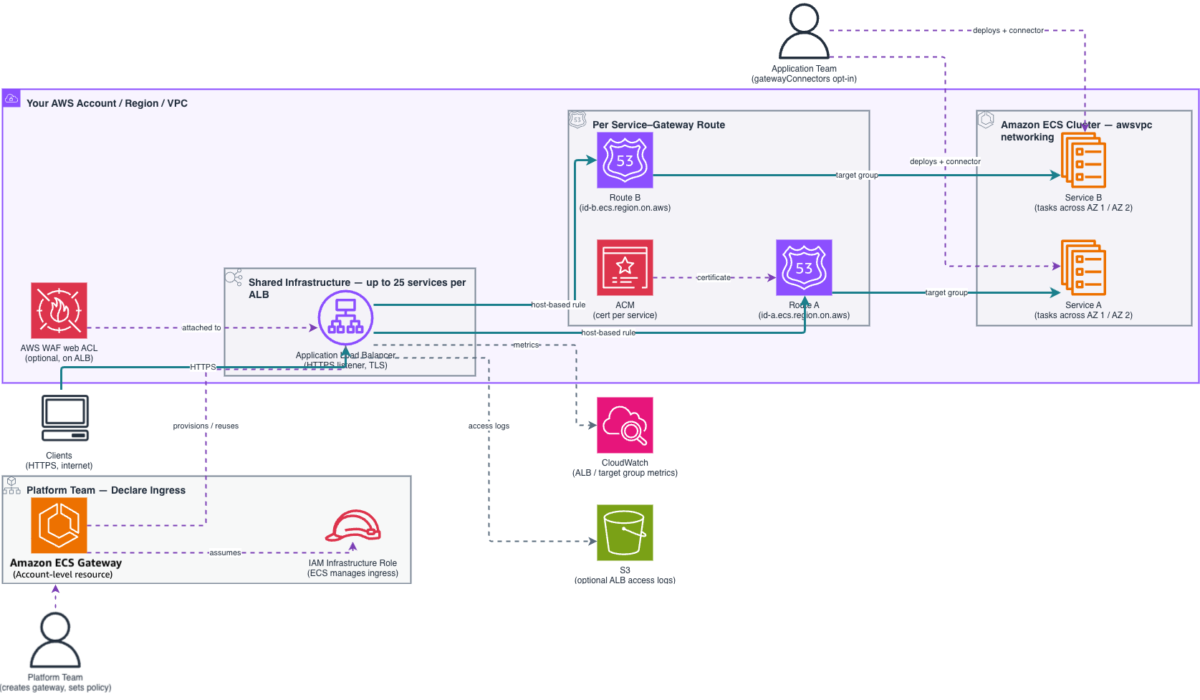
Platform teams create and configure a gateway, defining organizational networking standards including subnets, security groups, TLS certificates, listener settings, and WAF web ACLs, in a single place… They then associate the gateway with one or more ECS clusters, making it available to service…
When platform teams manage containerized applications at scale on Amazon Elastic Container Service (Amazon ECS), configuring ingress networking for each service often becomes a bottleneck. For every new service, teams must provision and connect Application Load Balancers (ALBs), AWS Certificate Manager (ACM) certificates, AWS WAF web ACLs, and security groups, then keep those resources in sync as services scale, update, or operate. This per-service overhead slows down deployment velocity and increases the risk of configuration drift across an organization.
Today, we’re announcing Amazon ECS Gateway, a new account-level resource that simplifies ingress networking for containerized workloads by dynamically provisioning and managing the necessary infrastructure on your behalf, with all resources created directly in your account.
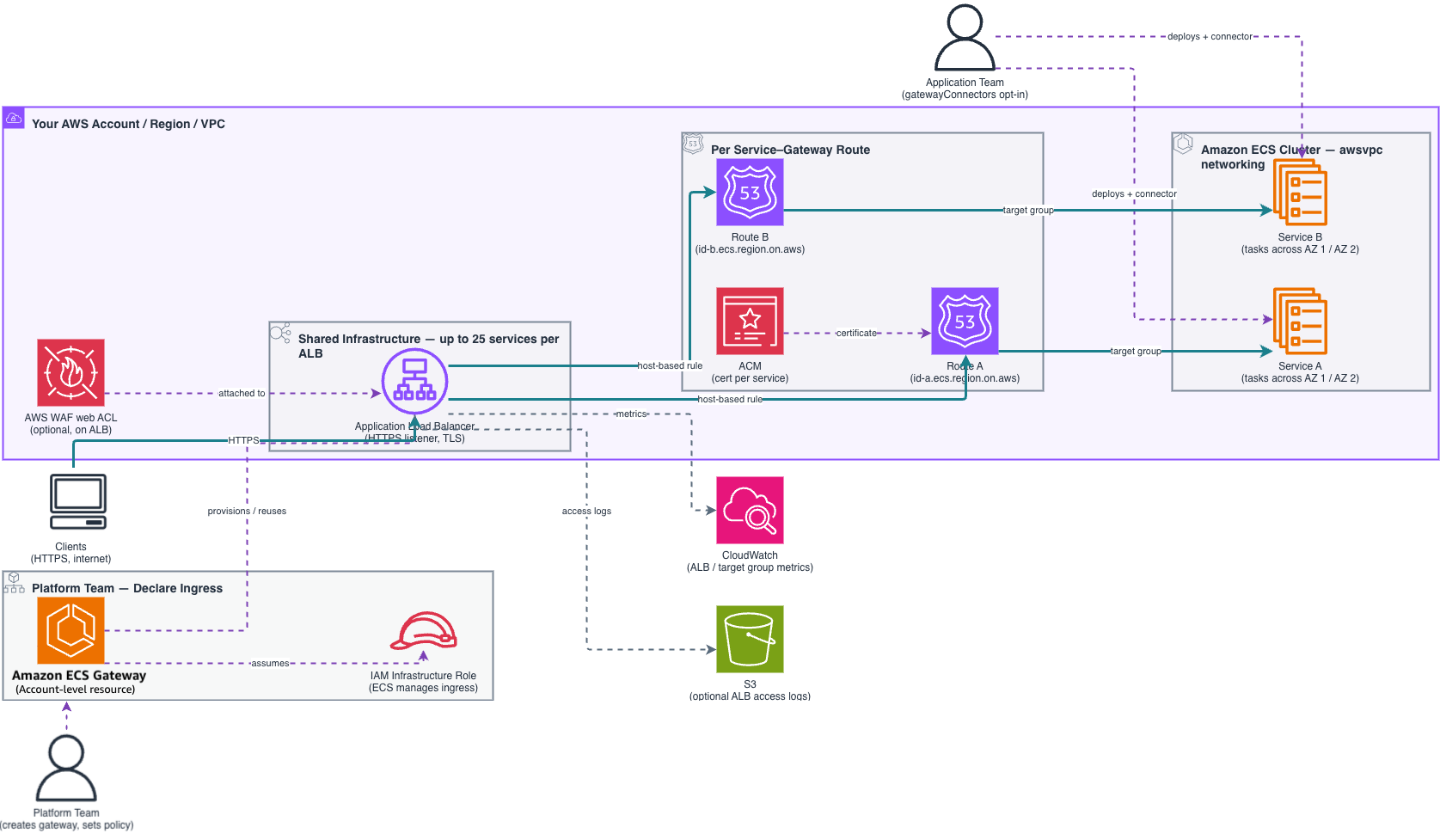
ECS Gateway introduces a clear separation of responsibilities between platform teams and application teams.
- Platform teams create and configure a gateway, defining organizational networking standards including subnets, security groups, TLS certificates, listener settings, and WAF web ACLs, in a single place. They then associate the gateway with one or more ECS clusters, making it available to services running on those clusters.
- Application teams opt their services in by adding a gateway connector parameter when creating or updating a service. ECS provisions the required per-service resources automatically: an ACM certificate, a unique DNS hostname, listener rules, target groups, and a service security group that permits inbound traffic only from the ALB. No networking expertise required.
ECS Gateway offers host-based routing using ALBs and enables up to 25 services to share a single ALB, optimizing infrastructure costs. ECS manages the full lifecycle of the underlying infrastructure, provisioning the first ALB when your first service connects, adding more ALBs as capacity is reached, and removing them when no longer needed. Each service receives a unique DNS hostname, giving your teams a ready-to-use endpoint the moment provisioning completes.
A first look at ECS Gateway
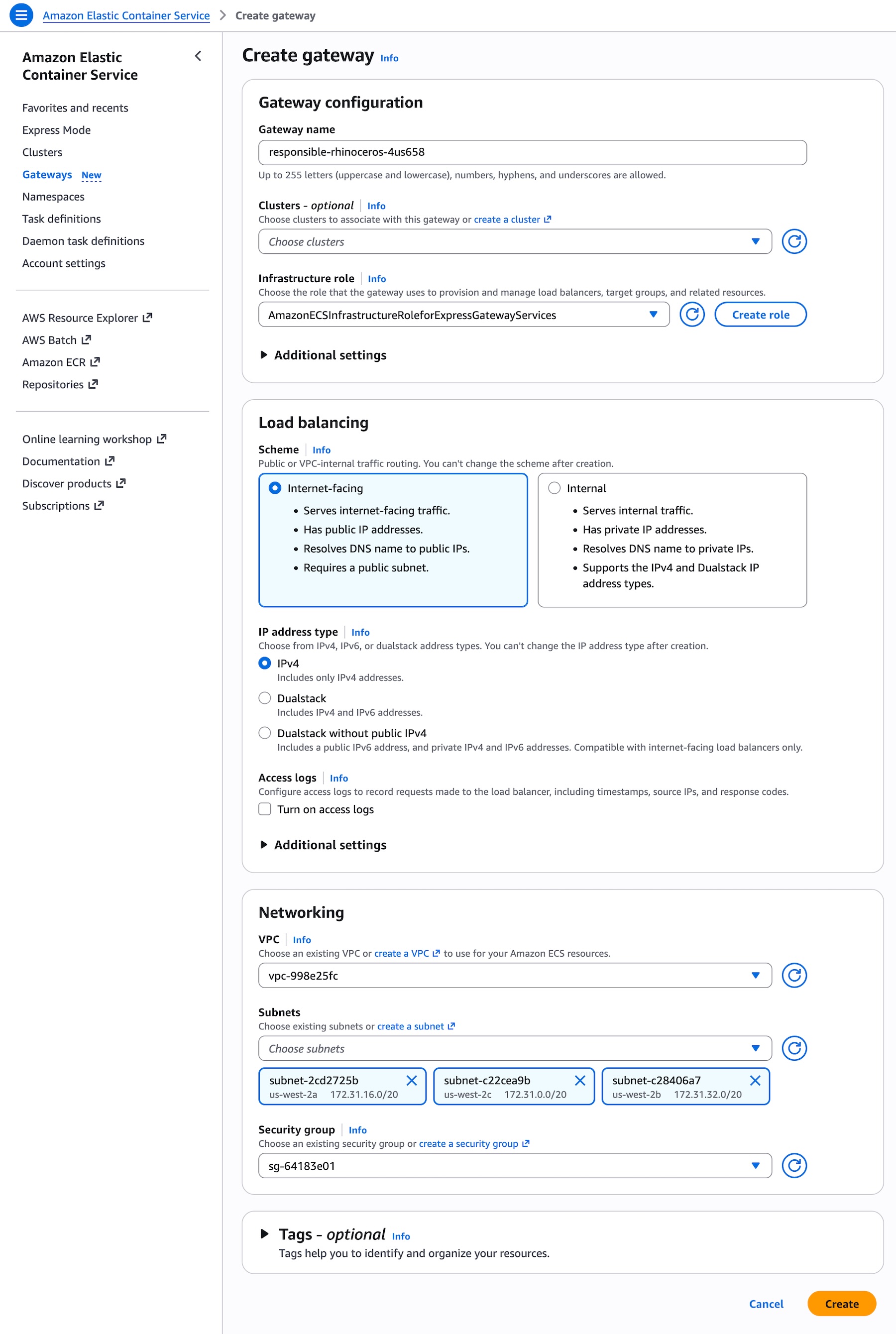
In the ECS console, platform team can create a gateway and sets its configuration. The infrastructure role is an IAM role that ECS assumes to provision and manage networking resources such as ALBs, security groups, and certificates in your account. To create a gateway, provide a gateway name and select an infrastructure role. You can optionally associate the gateway with ECS clusters during creation or later.
Choose a load balancing scheme, either public or VPC-internal traffic routing. Under Additional Settings, you can also set up a listener, port, maximum count of load balancers the gateway can scale to, and a web ACL lets you protect your web applications. Some settings, including the name, scheme, VPC, subnets, IP address type, listener protocol and port cannot be changed after gateway creation.
Using AWS Command Line Interface (AWS CLI), call CreateGateway with a name (unique per account), an infrastructure role, and a configuration object. No infrastructure is provisioned until a service connects with a gateway connector.
aws ecs create-gateway
  --name my-team-gateway
  --infrastructure-role-arn arn:aws:iam::123456789012:role/ECSGatewayRole
  --configuration '{
    "HostSharedAlb": {
      "networkConfiguration": {
        "subnets": [
          "subnet-080779f9bd887757a",
          "subnet-03d5b2fead6bc6258",
          "subnet-0861210a397d31252",
          "subnet-06539e194023cb77a"
        ],
        "ipAddressType": "ipv4"
      },
      "scheme": "internet-facing"
    }
  }'
Once the gateway is created, you can take a look at the detailed configuration, gateway routes, load balancers, and associated clusters.
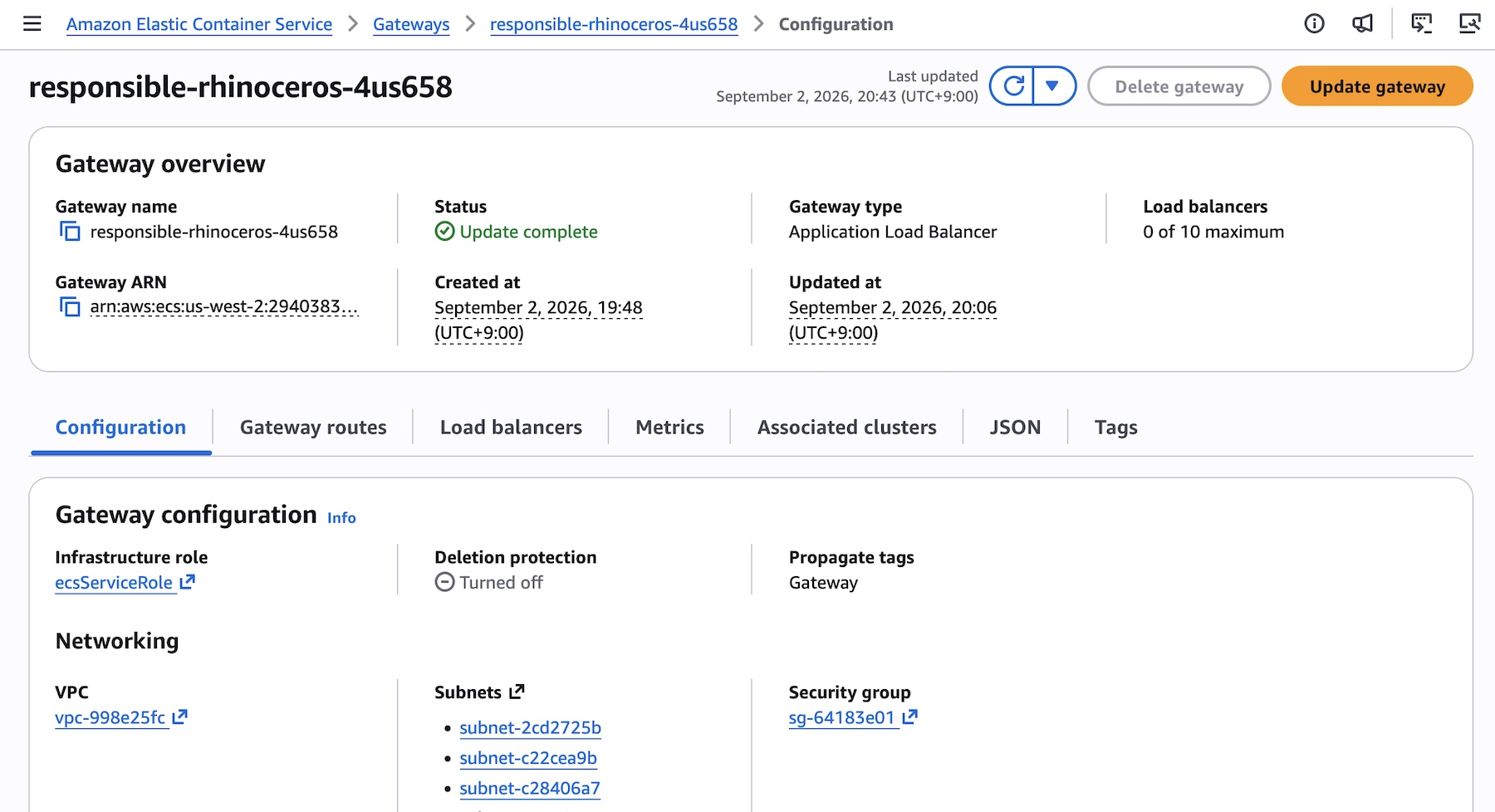
Now associate the gateway with one or more clusters (many-to-many), to make it available to ECS services on those clusters.
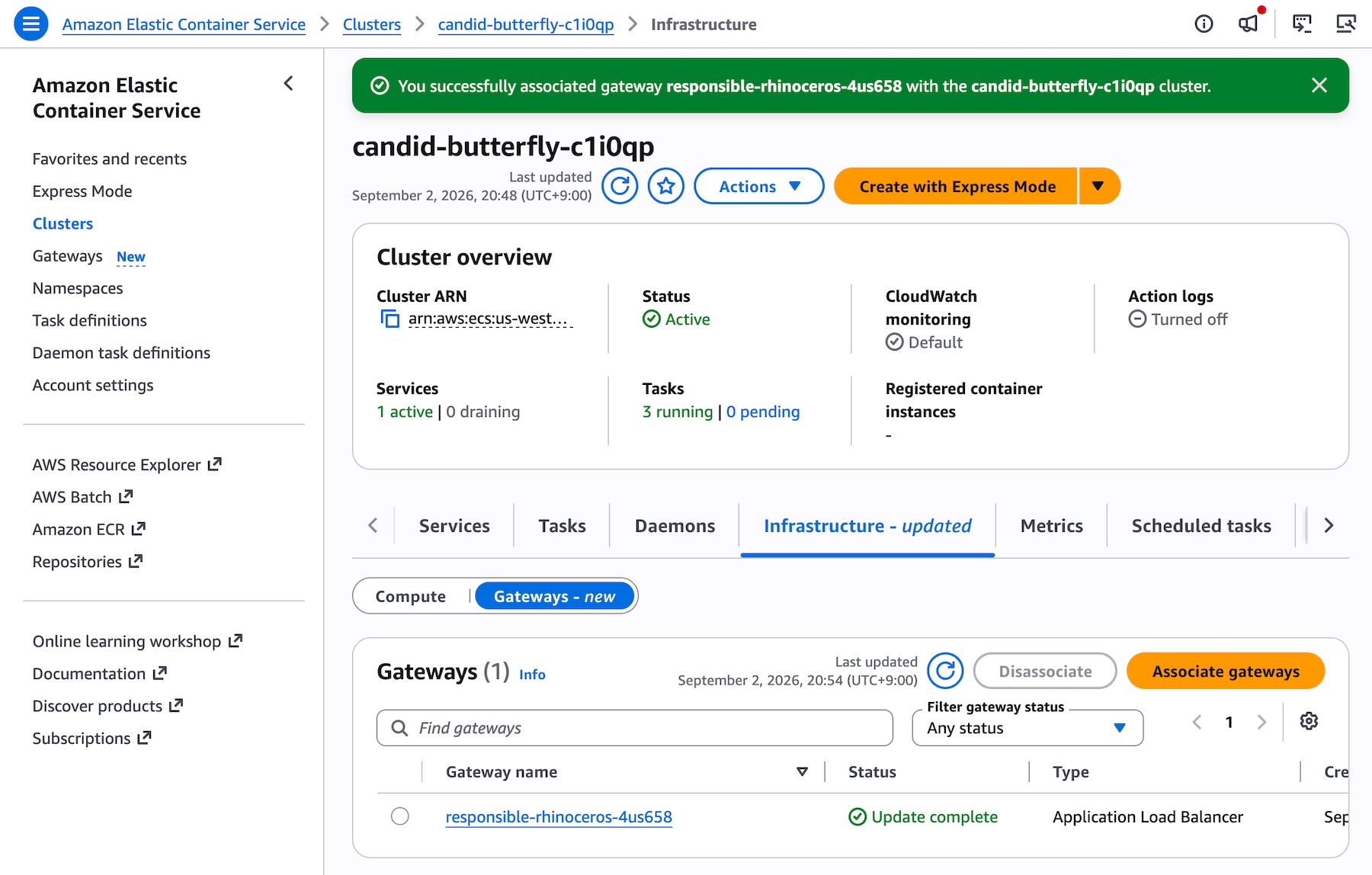
Use AssociateGatewayWithCluster to make the gateway available to services on a cluster:
aws ecs associate-gateway-with-cluster
--gateway my-team-gateway
--cluster arn:aws:ecs:us-east-1:123456789012:cluster/my-cluster
To create and manage the ECS Gateway programmatically, including calling APIs and searching documentation, try the AWS MCP Server and plugins with your preferred AI coding tool. To learn more, visit the Amazon ECS Gateway documentation.
ECS Gateway:Behind the scenes
A gateway can be associated with up to 10,000 clusters, and a single cluster supports up to five gateway associations. This many-to-many relationship gives platform teams the flexibility to share a gateway across environments or assign multiple gateways (for example, public and private) to a single cluster.
Platform teams can control access by choosing which gateways to associate with which clusters. For additional control, use IAM policies to restrict who can deploy services to specific clusters.
Application teams add the gateway connector to each service definition in CreateService or UpdateService. If you have an existing ECS service with its own load balancer, you can adopt ECS Gateway incrementally by calling UpdateService to add a gateway connector. Both ingress paths remain available, allowing you to validate the gateway connection before removing the existing load balancer configuration.
aws ecs create-service
  --cluster my-cluster
  --service my-api-service
  --task-definition my-api-service:1
  --gateway-connectors '[{ "portName": "api", "filters": {"accessTypes": ["PUBLIC"]}, "healthCheck": {...} }]'
At deployment time, Amazon ECS evaluates the gateways associated with the cluster and connects the service to every compatible gateway. A gateway is compatible when its access type matches the service’s connector filter, it is in the same VPC as the service, and it covers all Availability Zones used by the service’s configured subnets.
For each connection, Amazon ECS assigns the service to an ALB with available capacity and provisions the per-service resources: an ACM certificate, a unique DNS hostname, a listener rule routing traffic for that hostname to the service target group, and a service security group allowing inbound traffic only from the ALB security group. If no existing ALB has capacity, ECS creates a new one (up to maxAlbCount referring to quota limit). Once provisioning completes, the gateway route becomes ACTIVE, and the service URL is ready to receive traffic.
ECS Gateway handles common operational scenarios automatically:
- Redeployments: On each deployment, ECS re-evaluates gateway associations. If new compatible gateways have been associated since the last deployment, your service connects to them. If a gateway has been disassociated, your service disconnects and the route is removed. Your service always reflects the current state of the cluster gateways at deployment time.
- Service deletion: ECS automatically disconnects the service from every gateway, removes all gateway routes, and cleans up all per-service resources. If the service held the last route on an ALB, that ALB is deprovisioned.
Things to Know
Here are a few important details to keep in mind:
- Networking: ECS Gateway is available for ECS services using the
awsvpcnetwork mode across all launch types (Amazon ECS EC2, AWS Fargate, and ECS Managed Instances). Your service Availability Zones (AZs) must be a subset of each gateway’s AZs on the cluster. A gateway ALB only routes traffic to tasks in AZs where it has subnets. We recommend creating gateways and services for a given cluster with the same set of AZs. - Capacity: If
maxAlbCountis reached and no ALB has available capacity, the deployment fails. Default quota limit ofmaxAlbCountis 10. Plan yourmaxAlbCountsetting according to the number of services you expect to connect. - Observability: Use ALB metrics in CloudWatch with the
TargetGroupdimension to monitor per-service traffic, andLoadBalancerdimension to monitor traffic across the shared ALB. Usedescribe-target-healthto check real-time target status. Configure CloudWatch alarms for metrics such asHealthyHostCount,TargetResponseTime, andHTTPCode_Target_5XX_Count, using gateway ARN-based tagging so monitoring scales automatically with yourmaxAlbCount.
Now available
Amazon ECS Gateway is available now in all commercial AWS Regions where ECS is available at no additional charge. You pay only for the underlying infrastructure provisioned in your account when services connect to a gateway, including applicable ALB charges, CloudWatch logs and metrics, ACM certificates, and data transfer charges. To learn more, visit the Amazon ECS Pricing page.
To get started, create your first gateway today in the ECS console, and send feedback to AWS re:Post for ECS or through your usual AWS Support contacts.
— Channy
Author: Channy Yun (윤석찬)